
CRM implementation for B2B companies · process, system selection, team
CRM implementations tailored to your company
Your process, our recommendations. We don’t impose a CRM system – we tailor it to you. InStream Group is the first Sales House to support your sales and lead generation.
- over 250 CRM implementations
- partner of 8 CRM systems
- 10 years of building technology
Trusted by 1,700 companies from Poland and around the world
Starting point
Where are you today?
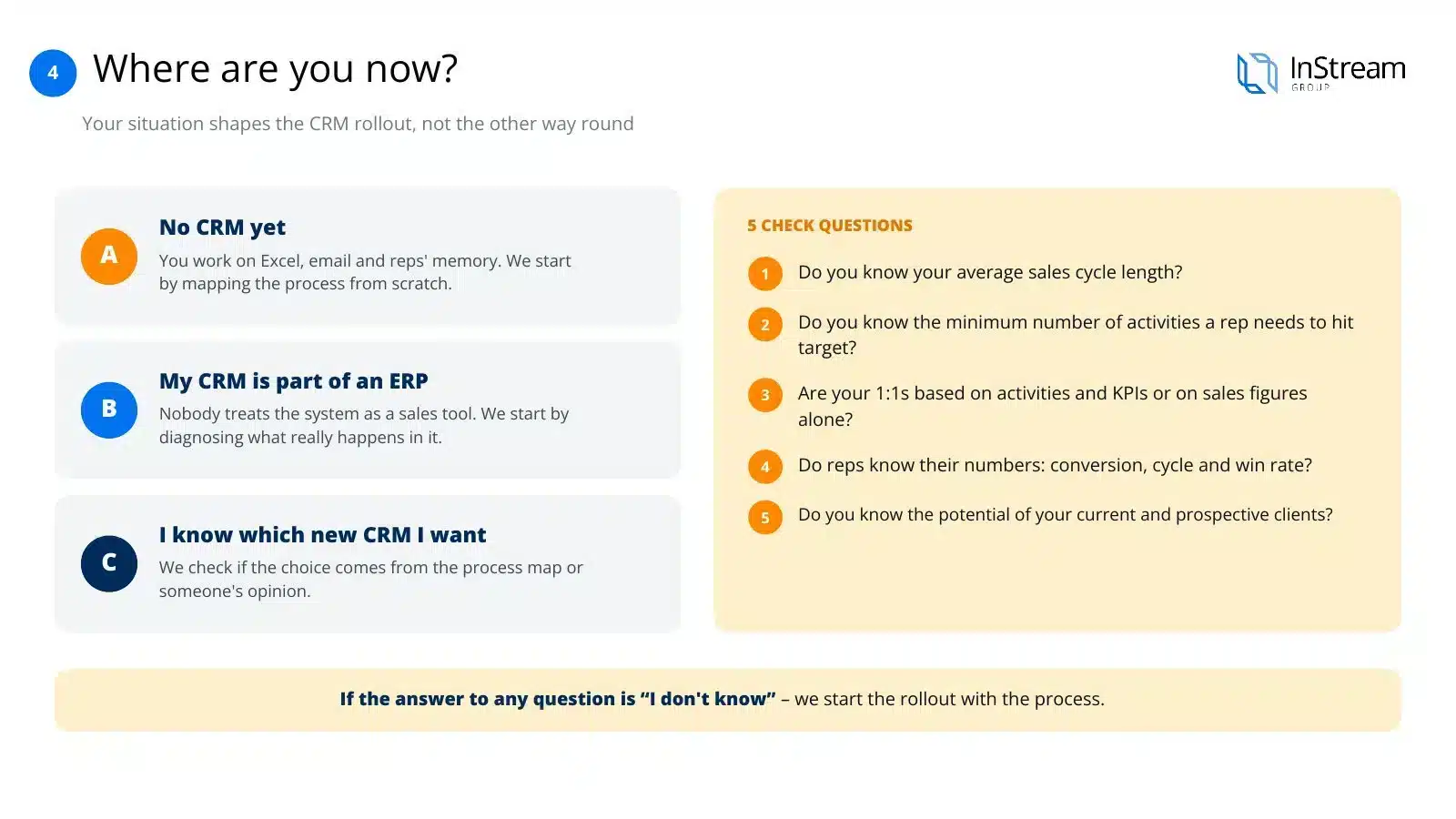
Before we start talking about a specific system, we need to know where you’re starting from, because your situation determines how the CRM implementation goes, not the other way round.
A · I don’t have a CRM
You work with Excel, emails and salespeople’s memory. We start by mapping the process from scratch.
B · I have a CRM, but it’s part of an ERP
The system exists, but nobody treats it as a sales tool. We start by diagnosing what really happens in it.
C · I have a CRM, I want a different one and I know which
You already have an opinion on the target system. We check whether the choice comes from a process map or from someone else’s opinion.
Presentation
See how we implement CRM systems
Twelve slides: why CRM implementations don’t deliver results, the modules of a good CRM, choosing a system from eight partners, eight implementation steps, the schedule and project pricing.
Arrows, swipe or click a thumbnail
Voice-over script for this slide
A well-implemented CRM works for your sales every day. We start with your sales process and only then match the system to it.
Many companies buy a good system and go back to spreadsheets after a few months. The reason rarely lies in the tool itself. Without a documented process, the CRM doesn’t know how your team sells. That’s why we first organise the process and only then choose the system.
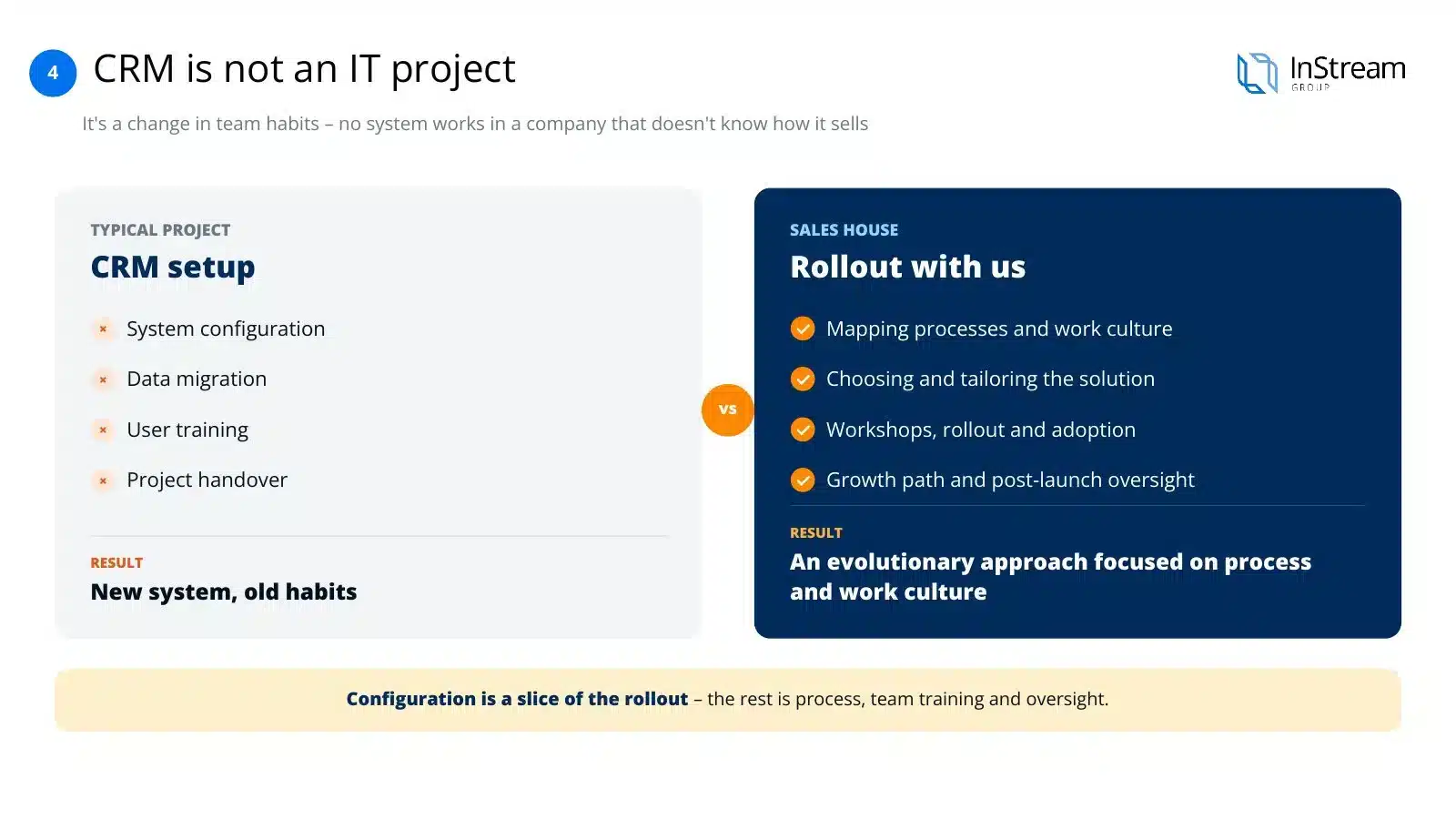
A CRM implementation is above all a change in the team’s habits. Configuration alone gives you a new system with old habits. We guide your team from the process map, through workshops, to supervision after launch.
Every company starts from a different place. Some still work on spreadsheets, others have a system nobody uses. After a few questions about the numbers in your sales, we know where to start the implementation.
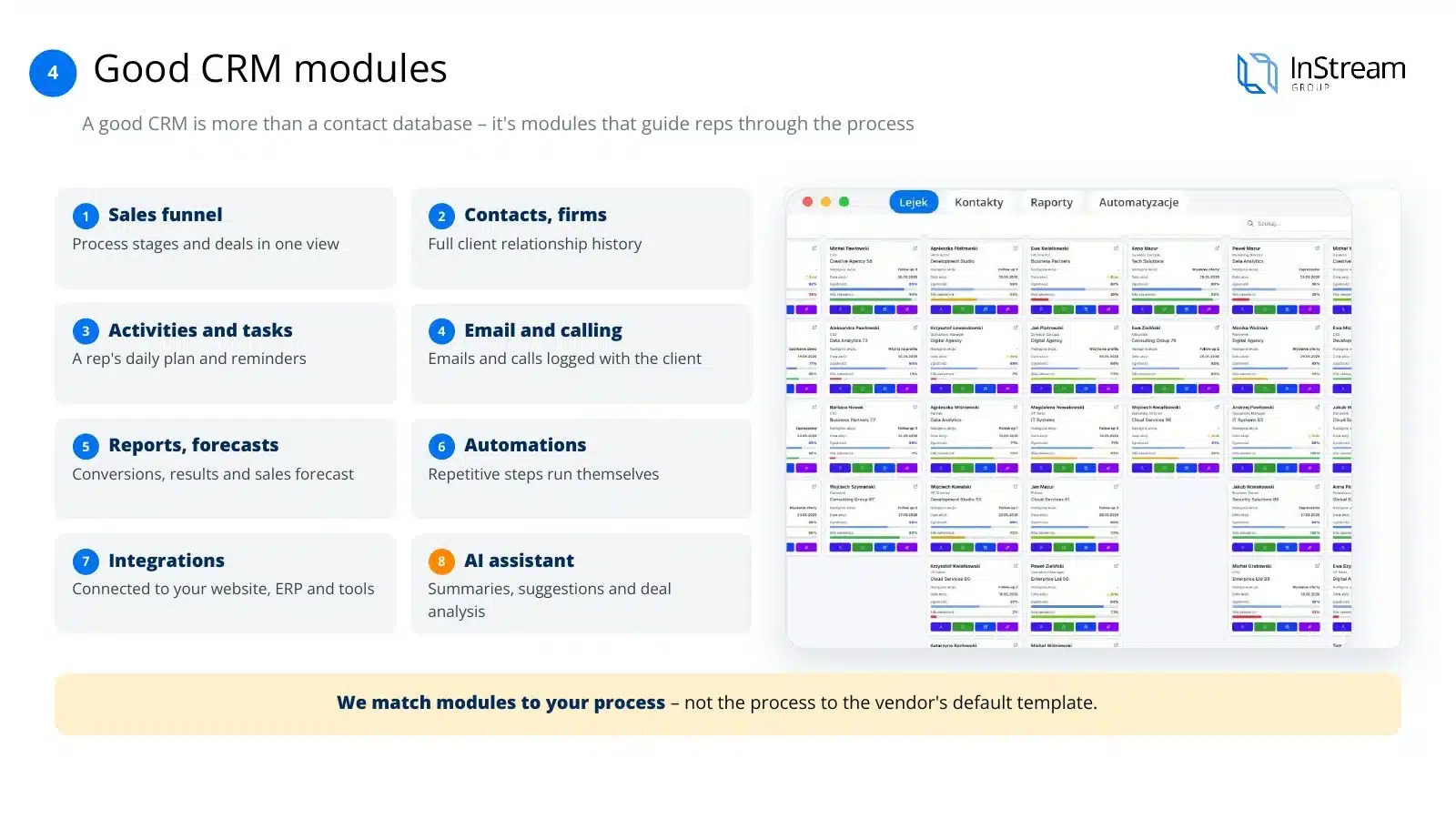
A good CRM is more than a contact database. It guides the salesperson through the successive stages of the conversation with the client and gives the manager reliable data. We choose the system’s functions to fit your process, not the vendor’s ready-made template.
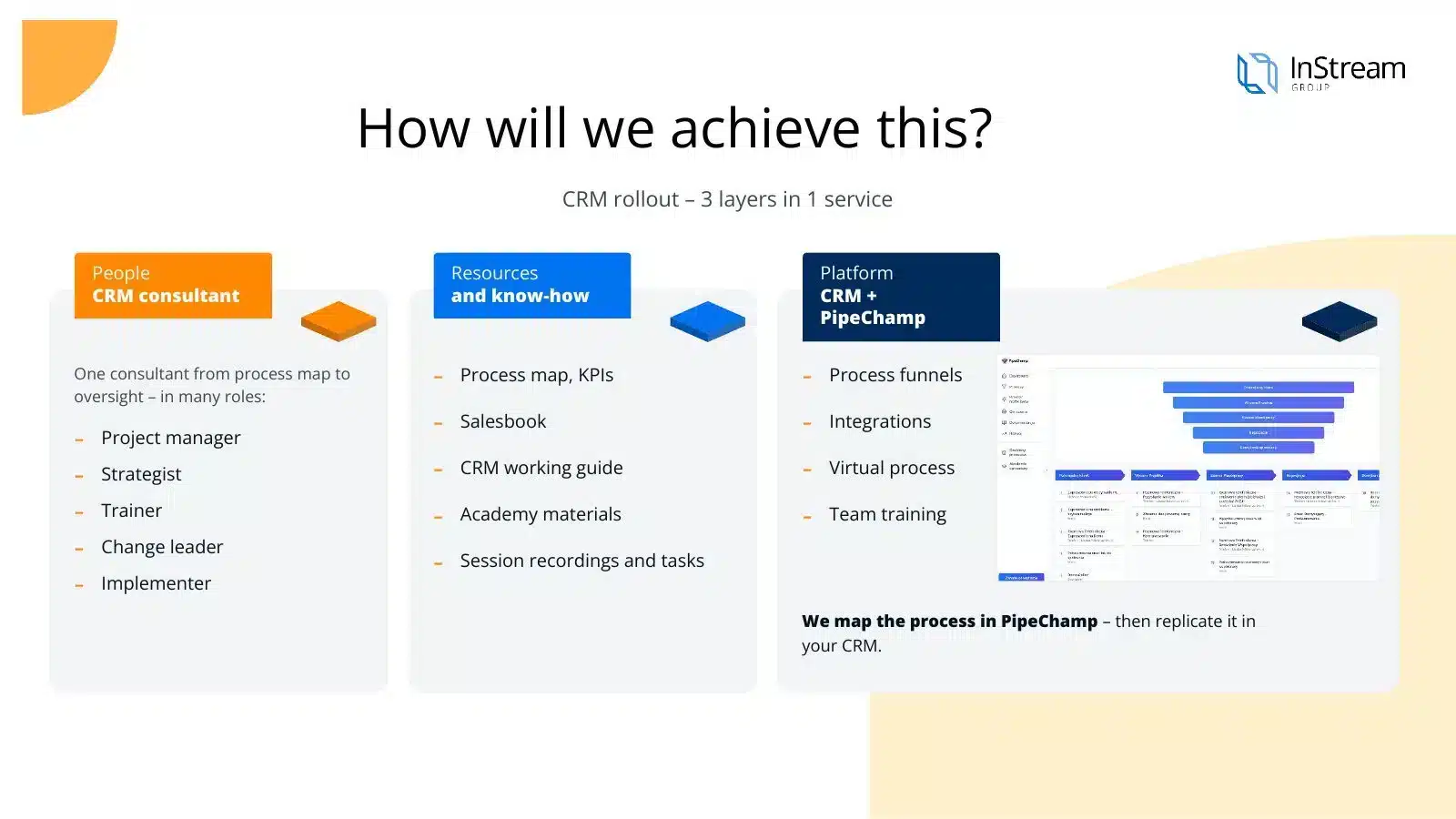
The whole implementation is run by one consultant who has known your company since the first conversation. You get ready process documentation and materials for the team from us. We first map the process in PipeChamp and only then transfer it to the chosen CRM.
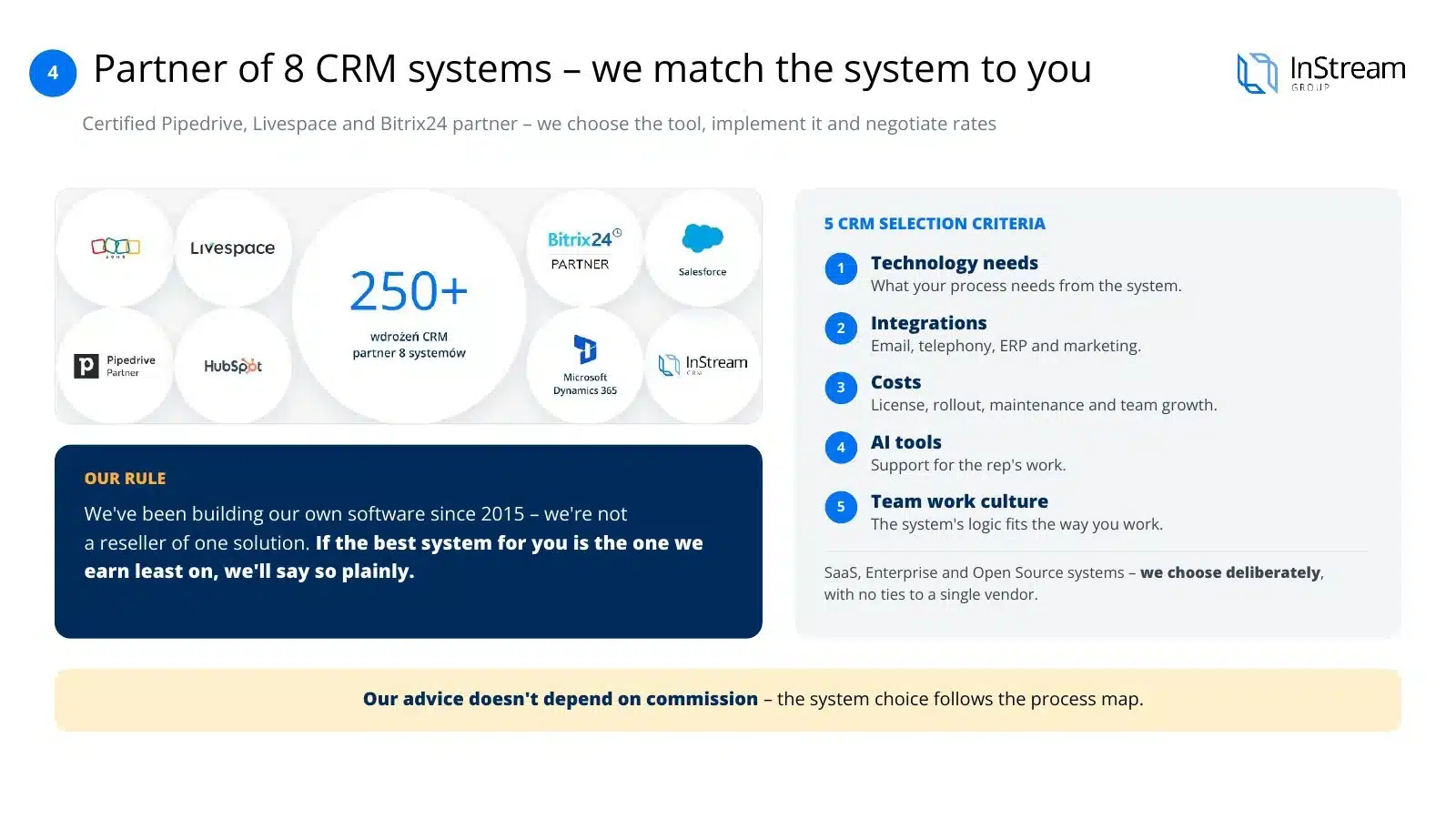
We work with many CRM vendors, so we advise without being tied to one solution. The recommendation depends on your process, budget and the way your team works. If the best system for you is the one we earn least on, we’ll say so plainly.
We guide you through the whole project: from understanding how you sell to support after the system goes live. We represent you in talks with vendors and help negotiate terms. The decision is always yours.
A system only comes alive when the team has tools around it that are useful every day. That’s why we connect the CRM with salespeople’s work tools and with AI solutions. The result is organised sales and better insight into the team’s work.
An IT company launches the system according to the specification and ends its work there. We hold ourselves accountable for whether your team really works in the CRM. After launch we stay with you and develop the system together with the company.
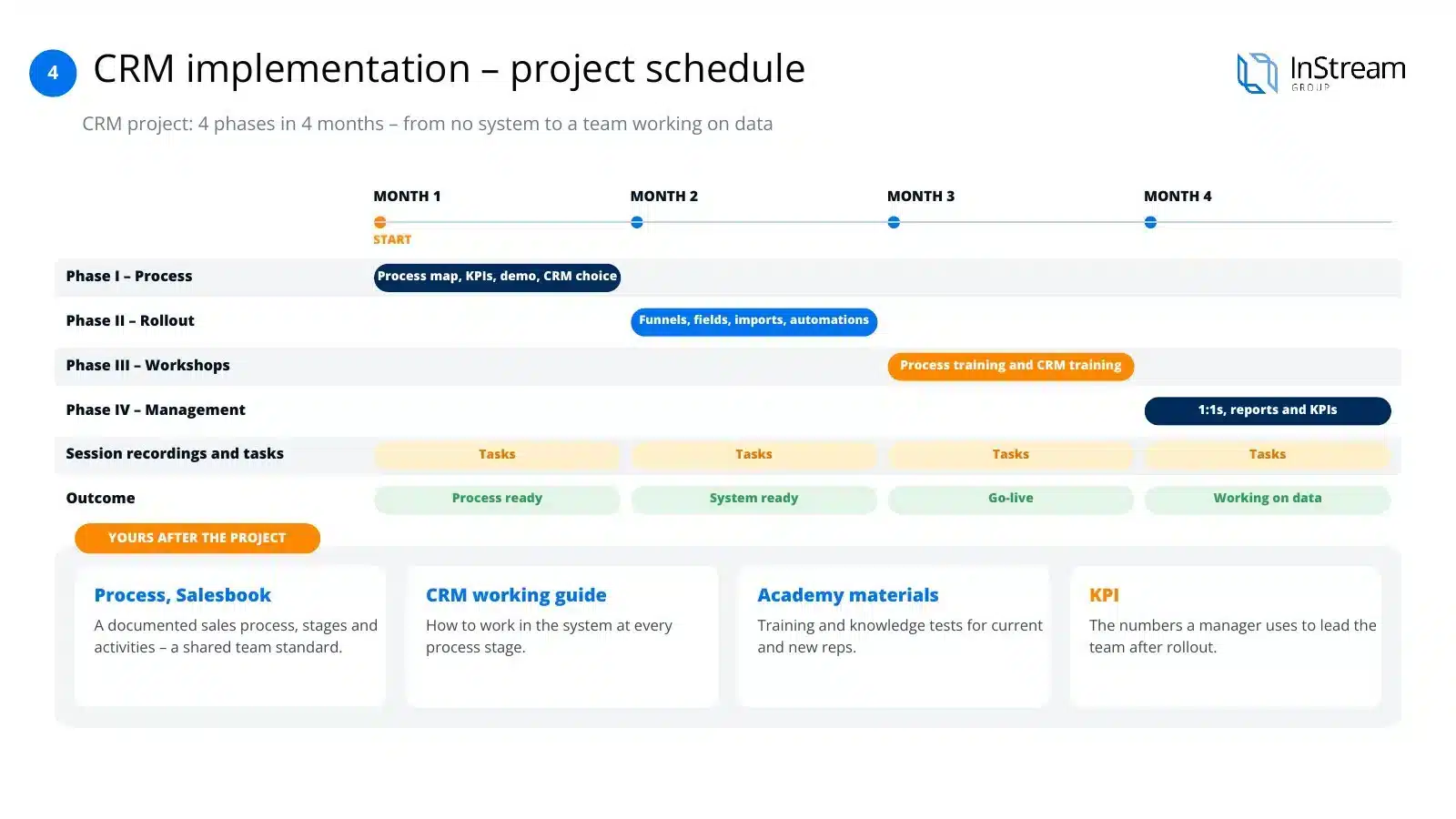
A typical project takes 4 months. Each month ends with a concrete result, until the team starts working with data. After the project, the process documentation and training materials stay in your company.
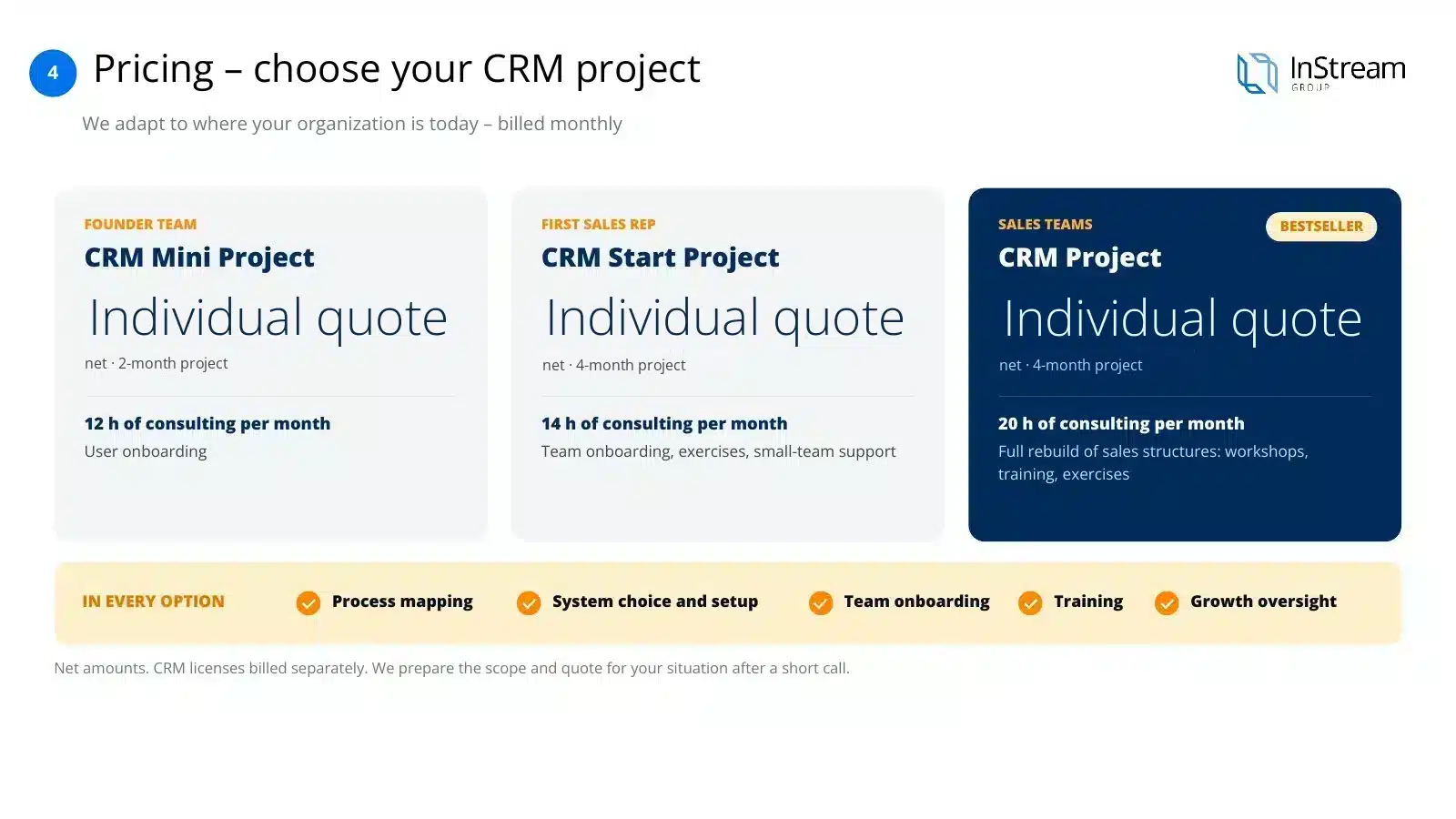
We match the CRM project to your company’s stage. We quote each CRM project individually and you pay monthly. We’ll prepare the scope for your situation after a short conversation.
Before you implement a CRM: do you have a process map?
Before anyone asks which CRM to choose, they should ask: do we have a documented sales process? Do we know how we really sell — not in theory, but in practice, step by step? Most companies have neither a process map nor documentation. Sales happen “by feel”, every salesperson does it a little differently, and the knowledge of what works stays in people's heads, not in the system.
Why it matters so much: a CRM without a process is a machine without an instruction manual. You can have the best system on the market — if you don't know how your team actually sells, the system won't know either.
Reversing the order
Implementing a CRM without a process map means configuring fields for a process nobody has described. At best, the system will replicate the chaos you already have — only more expensively.
Sales Booster
How we do it as part of Sales Booster
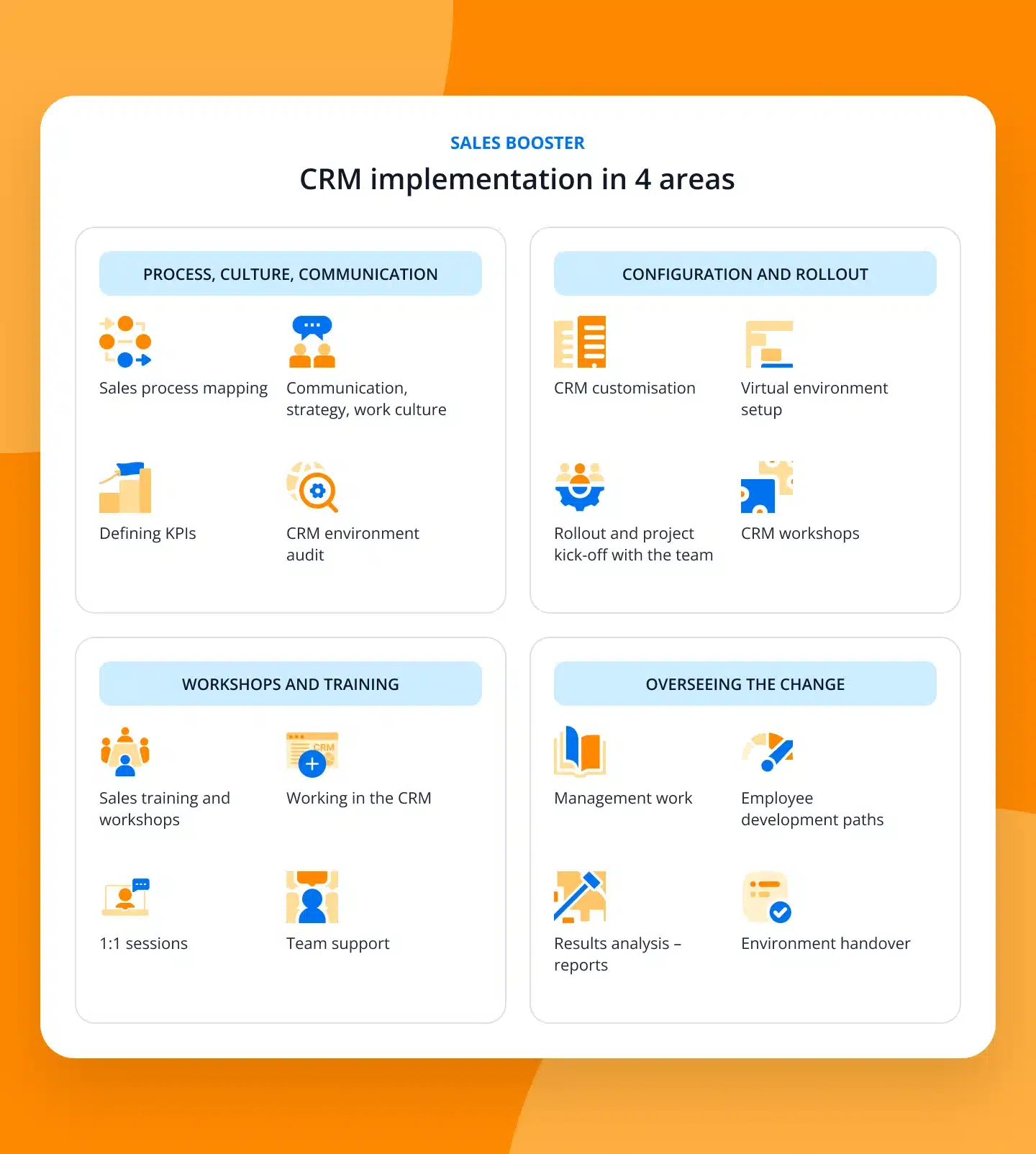
A CRM implementation at InStream is not a separate IT project — it's part of the programme Sales Booster, through which we rebuild entire sales departments. We don't start with the question “which system?”. We start by mapping the sales process and team structure, and choosing and configuring the CRM is a natural next stage of the same work.
The same consultant guides your company from day one — not a separate implementation crew that only gets to know you when configuring the system.
Result
A CRM that reflects your actual sales process, not the system vendor's generic template.
Modules of a good CRM
Examples of a good CRM and its modules
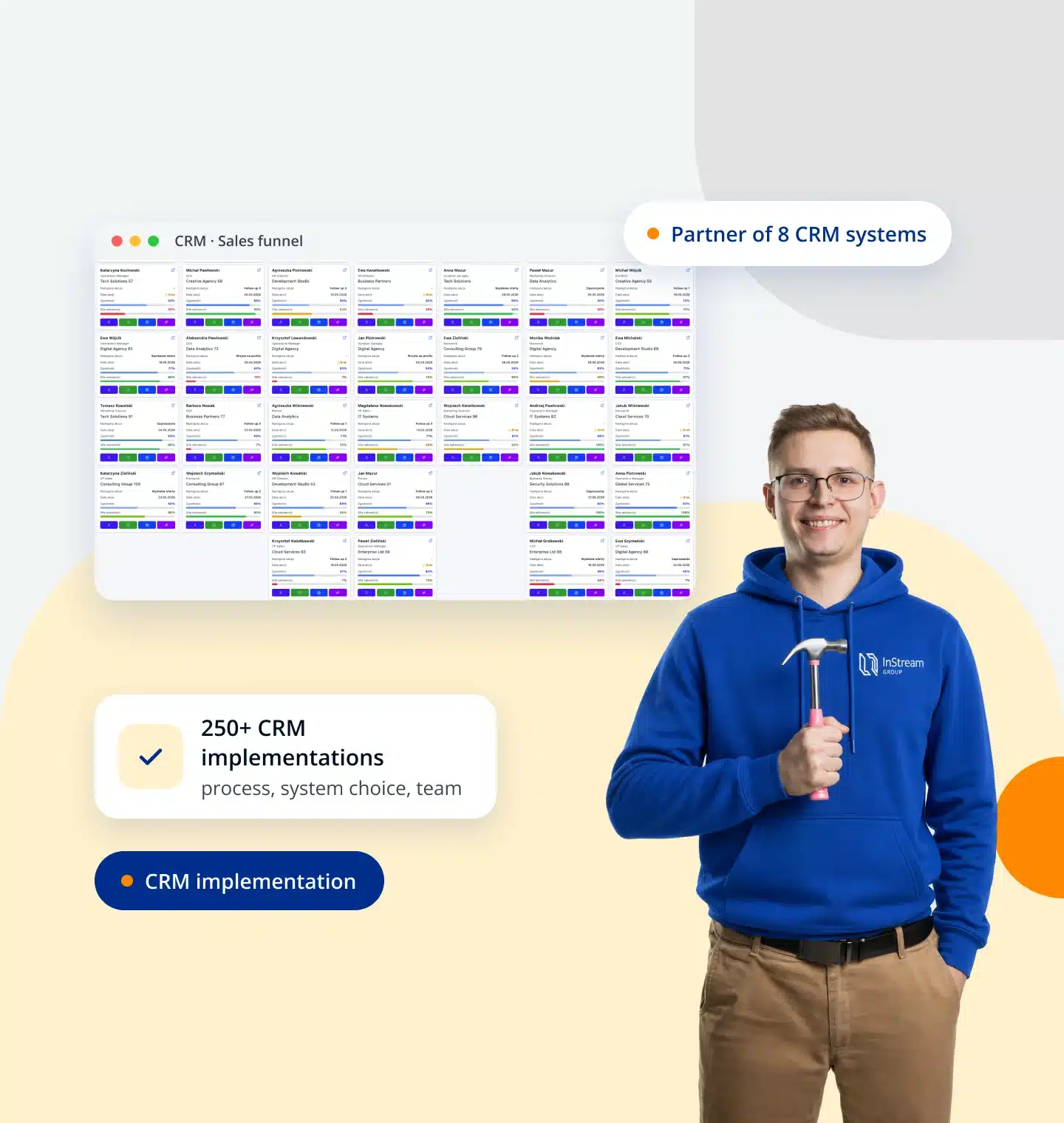
A good CRM is more than a contact database. It's several cooperating modules that guide the salesperson through the process and give you numbers for making decisions.
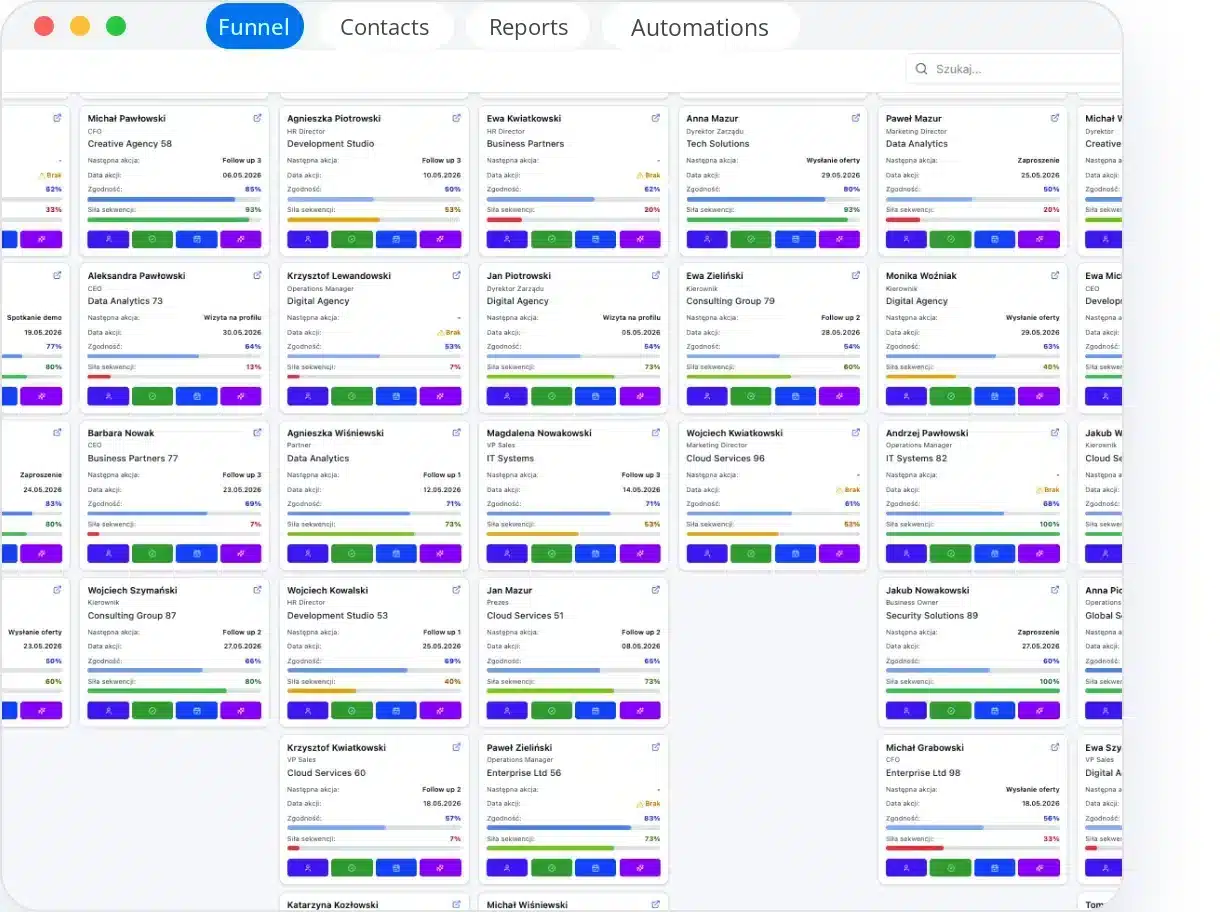
- Sales funnelProcess stages and opportunities in one view
- Contacts and companiesThe full history of the client relationship
- Activities and tasksThe salesperson's day plan and reminders
- Email and telephonyEmails and calls saved with the client
- Reports and forecastsConversions, results and sales forecast
- AutomatyzacjeRepetitive steps happen on their own
- IntegrationsConnection with the website, ERP and tools
- AI assistantSummaries, suggestions and opportunity analysis
One consultant runs the CRM implementation
One person – many roles
From day one you work with the same consultant, not with someone from an implementation department.
The consultant is a PM who runs the CRM implementation
Looks after the project and oversees its progress. Records meetings, keeps track of tasks and the schedule, and guides the team step by step until they work in the system every day.
- One implementation manager from the process map to supervision
- Every meeting recorded and summarised with a task
- Ongoing supervision of the team’s work in the CRM


The consultant is a strategist who designs the process before the system
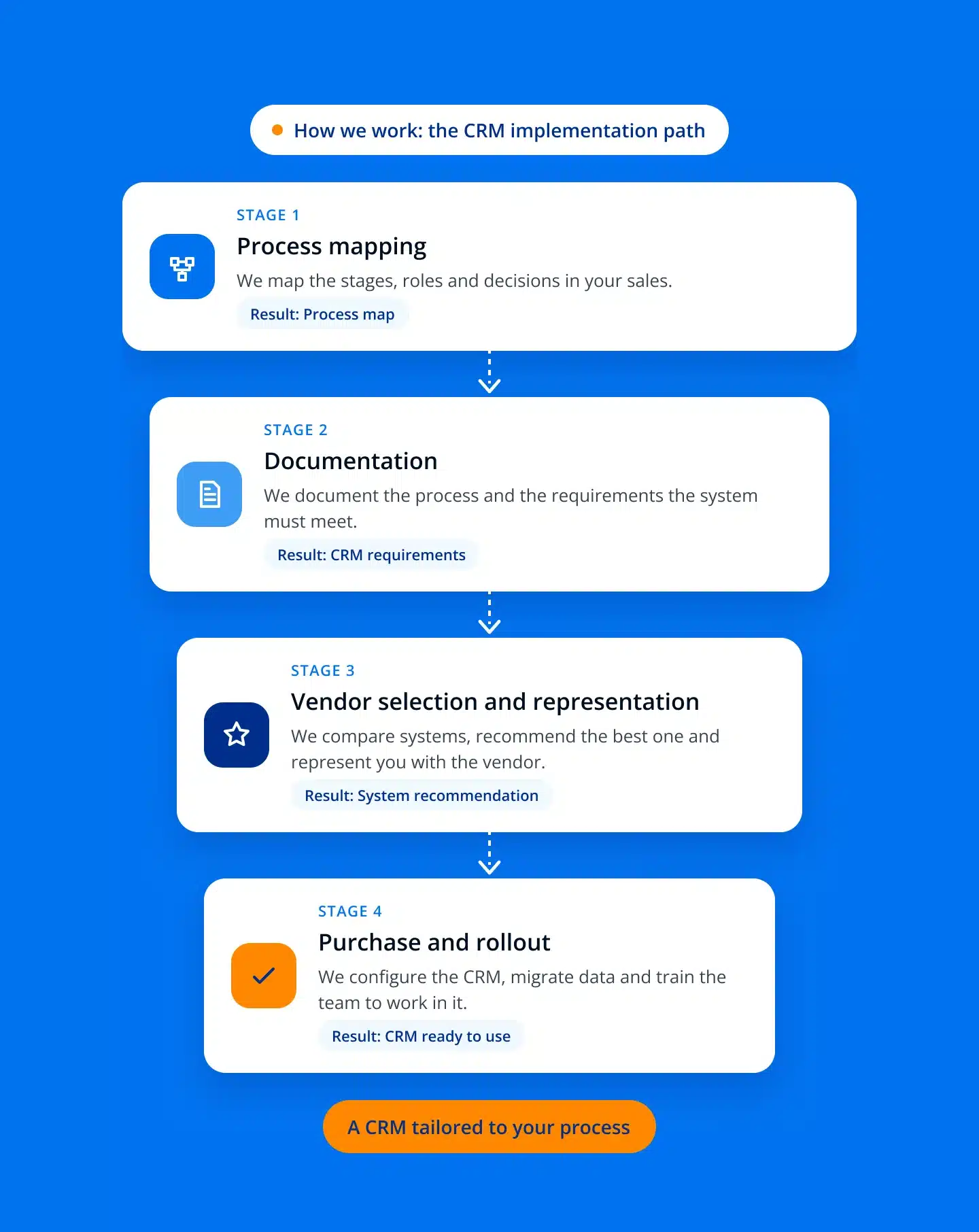
Maps your sales process, roles and decisions. On this basis writes down the requirements for the CRM and recommends a system that fits how you really work.
- A process map before choosing the system
- CRM requirements written down together with the team
- A recommendation based on the process map
The consultant is a trainer who teaches the whole team to work in the CRM
Runs CRM workshops and 1:1 sessions with salespeople and leaders. Practises daily work in the system with the team, including on a virtual process in PipeChamp.
- CRM workshops for the whole team
- 1:1 sessions with salespeople and leaders
- Training on a virtual process in PipeChamp
The consultant is a change leader who keeps an eye on new habits
The implementation only ends when the team actually works in the system. The consultant sets KPIs, analyses reports and supports managers so they set an example for the team.
- KPIs and roles in the system from the start
- Reports and analysis of the team’s results
- Supporting managers in leading the team
The consultant is an implementer who configures the CRM and tools
Configures the CRM to the process map, migrates data and implements sales tools and an AI layer. Finally hands the team an environment ready to work in.
- CRM configured for your process
- Data migration and integrations
- Sales enablement and AI tools
Process first, then the CRM system
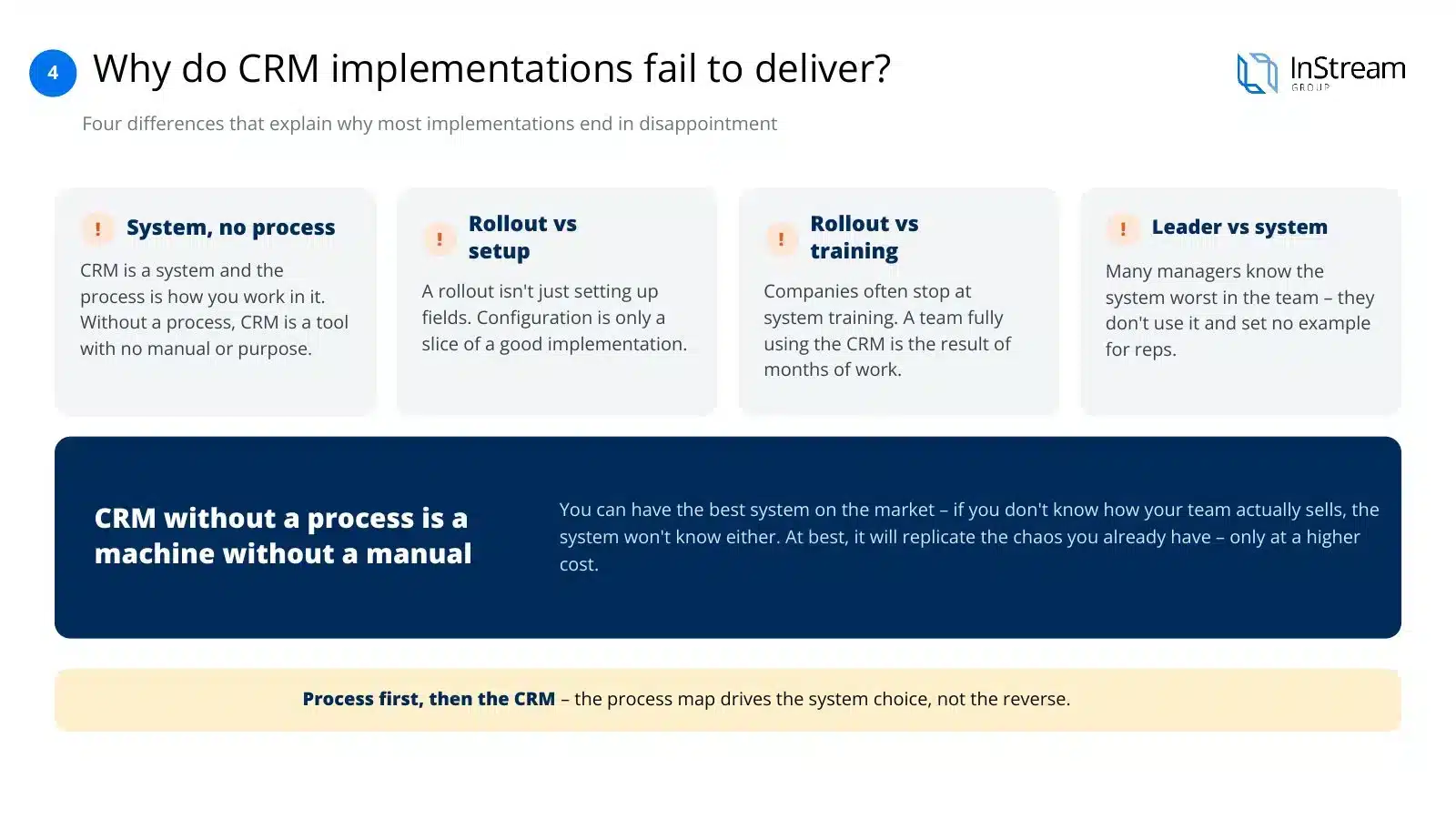
Four differences that explain why most implementations end in disappointment:
A system without a process
A CRM is a system, and a process is a way of working in it. Without a process, a CRM is a tool without instructions or purpose.
Implementation vs configuration
Implementing a system isn't setting up fields. Configuration is only a slice of a good implementation.
Implementation vs training
Companies often stop at training on how to use the system, but a team that fully uses it is the result of months of work, not one workshop.
Leader vs system
Many managers know the system least well in the team — they don't use it and don't set an example for salespeople.
How to choose a CRM for your company — 5 criteria
Choosing a system is the result of a process map, not the starting point. Once you know how you sell, you evaluate systems against five criteria:
- Technology needsWhat your process actually requires of the system, not what the system can do in theory.
- IntegrationsWhat the CRM must connect with: email, telephony, ERP, marketing tools.
- CostsNot just the licence, but implementation, maintenance and the cost of growing with the team.
- AI toolsWhether and how the system supports the salesperson's work, without replacing human verification.
- Team work cultureWhether the system's interface and logic fit how your team actually works.
Types of CRM systems: SaaS, Enterprise and Open Source
Three categories worth choosing between consciously:
SaaS — for small and medium-sized companies
Licensed, configurable, online. A fast start, a lower entry cost and regular updates from the vendor. Most good choices for SMEs fall here.
Enterprise — for large organisations
Large systems, full-scale IT implementation projects and company-wide integrations. They require an IT team on the client side and a longer implementation.
Open Source / built from scratch
Systems built for the company from the ground up. They tempt with full control and a seemingly low cost, but today they're an increasingly bad idea — more in the section below.
Why you shouldn't build a CRM from scratch with AI (tempting as it is)
The IT department often argues that building your own system with AI is cheap and simple today. In practice it's one of the most expensive decisions a company can make in sales:
No support
When something breaks, there's no support line — there's only the developer who wrote it (if they still work at the company).
High maintenance costs
“Cheap” at the start means expensive later: every process change is another line of code to write and test.
IT doesn't know sales
The IT department knows technology, not sales — a system designed without sales knowledge reflects how IT imagines sales, not how it actually works.
Lack of integration and mobility
Systems written from scratch rarely have polished integration with email, telephony or a mobile app — what's standard in ready-made systems has to be built here first.
Do the maths yourself
How much does your own CRM really cost?
Tick the costs that fall on your company with your own system. On the right you'll see who bears them with a ready-made CRM from a market leader.
Ready-made systemA ready-made CRM from a market leader
- Software changeson the vendor's side, included in the subscriptionProvider
- Servers and maintenanceon the vendor's side, included in the subscriptionProvider
- Updates and securityon the vendor's side, included in the subscriptionProvider
- Fitting the processon the vendor's side, included in the subscriptionProvider
- Failures and downtimeon the vendor's side, included in the subscriptionProvider
- Technology gapson the vendor's side, included in the subscriptionProvider
- Managing external technologyon the vendor's side, included in the subscriptionProvider
A predictable subscription. Development, servers and security are provided by a vendor with scale.
That's why we rely on ready-made partners who are market leaders
A large partner with scale develops the system, maintains the servers and is responsible for security. You pay for using the CRM, not for building and maintaining it.
CRM ranking 2026: the 20 most popular systems (G2 and Capterra)
Compiled from the CRM categories on G2 and Capterra — the two largest independent B2B software review platforms. Ratings change every few weeks, so check the current scores on the platforms before deciding.
| # | System | Segment | Best for | G2/Capterra rating | Strength |
|---|---|---|---|---|---|
| 1 | Salesforce Sales Cloud | Enterprise | Large, complex organisations | 4,3 / 4,4 | The broadest ecosystem and customisation |
| 2 | HubSpot Sales Hub / CRM | Small–Mid | Marketing and sales teams together | 4,4 / 4,5 | A free start, integration with marketing |
| 3 | Pipedrive | Small–Mid | Teams focused on the sales pipeline | 4,3 / 4,5 | A visual pipeline, fast implementation |
| 4 | Zoho CRM | Small–Enterprise | A full package at a reasonable price | 4,1 / 4,3 | Very broad functionality at a low price |
| 5 | monday CRM | Small–Mid | Teams already using monday.com | 4,5 / — | No-code, visual configuration |
| 6 | Zendesk Sell / Suite | Mid | Sales + customer service together | 4,2 / 4,4 | Strong helpdesk integration |
| 7 | Microsoft Dynamics 365 Sales | Enterprise | Organisations in the Microsoft ecosystem | — / — | Integration with Office/Teams/Power BI |
| 8 | Creatio CRM | Mid–Enterprise | Low-code process automation | 4,7 / — | Flexible low-code for processes |
| 9 | ActiveCampaign | Small–Mid | Marketing automation | 4,4 / — | Marketing + sales automations |
| 10 | Close | Small–Mid | Phone/outbound sales | 4,7 / — | A built-in dialer, speed of work |
| 11 | Bigin by Zoho | Micro–Small | Very small teams, a first CRM | 4,6 / 4,7 | Simplicity, a low entry price |
| 12 | SAP Sales Cloud | Enterprise | Companies in the SAP ecosystem | 4,2 / — | Integration with SAP ERP |
| 13 | Nutshell | Small–Mid | Small teams looking for simplicity | 4,3 / — | An affordable price, ease of use |
| 14 | EngageBay | Small | Startups and micro-businesses | 4,6 / 4,6 | All-in-one at a low price |
| 15 | Copper | Small–Mid | Companies on Google Workspace | — / 4,4 | Native integration with Gmail/Google |
| 16 | Odoo CRM | Small–Enterprise | CRM as part of a larger ERP | — / 4,2 | A module within the full Odoo ecosystem |
| 17 | Keap | Small | Micro-businesses, freelancers | — / 4,1 | E-commerce and follow-up automation |
| 18 | Bitrix24 | Small–Mid | CRM + messenger + tasks in one | — / — | A very broad package for one price |
| 19 | Vtiger CRM | Small–Mid | An open, configurable alternative | — / — | Flexibility at a lower cost |
| 20 | Insightly | Small–Mid | Sales + project management | — / — | CRM + project management in one |
InStream recommendation
For small and medium-sized companies we most often recommend Livespace or Pipedrive — the fastest implementation and the best value for money for a typical B2B sales process. For large organisations with complex processes — Salesforce or Zoho (Enterprise) — where scale and integration complexity justify a higher implementation cost.
20 criteria we use to evaluate each system
Sales pipeline functionality, contact and company management, process automations, reporting and dashboards, email integration, telephony integration, ERP/accounting integration, mobile app, offline work, AI tools, ease of configuration without a developer, implementation time, licence price, implementation cost, maintenance cost, quality of technical support, availability of implementation partners in Poland, GDPR compliance, scalability as the team grows, flexibility to adapt to the industry.
Polish CRM systems — 10 solutions developed in Poland
A separate list of systems created and developed in Poland — a good choice when Polish-language support, compliance with local regulations and integrations with Polish tools (invoicing, payments) matter.
| # | System | Who it's for | Strength |
|---|---|---|---|
| 1 | Livespace | Small and medium-sized B2B companies | Our certified partner — a pipeline tailored to the B2B process |
| 2 | Firmao | Micro and small businesses | CRM + ERP modules in one system |
| 3 | Raynet | Small and medium-sized companies | Easy to implement, a good entry price |
| 4 | Tillio | Startups and growing teams | A modern interface, fast onboarding |
| 5 | Synergius CRM | Small and medium-sized service companies | Extensive reporting |
| 6 | QuickCRM | Micro and small businesses | Very fast implementation, simple configuration |
| 7 | Insly | Insurance and finance | Industry specialisation |
| 8 | Thulium | Companies with a customer service department | A CRM integrated with a contact centre |
| 9 | edrone | E-commerce | A CRM focused on marketing and online sales automation |
| 10 | Sugester | Micro and small businesses | Simplicity, a low price, a fast start |
The Polish CRM market changes quickly — check the vendor's current offer and price list before deciding.
30 CRM systems on the list. Which one is right for you?
Don't choose a CRM from a ranking. In a diagnostic call we'll check how you sell today and narrow the choice down to systems that fit your process, team and budget.
We work with Livespace, Pipedrive, HubSpot, Zoho, Bitrix24, Microsoft Dynamics 365 and Salesforce — we're not tied to one vendor, so our recommendation doesn't depend on commission.
Book a call about choosing a CRMHow we implement CRM at InStream — 8 steps
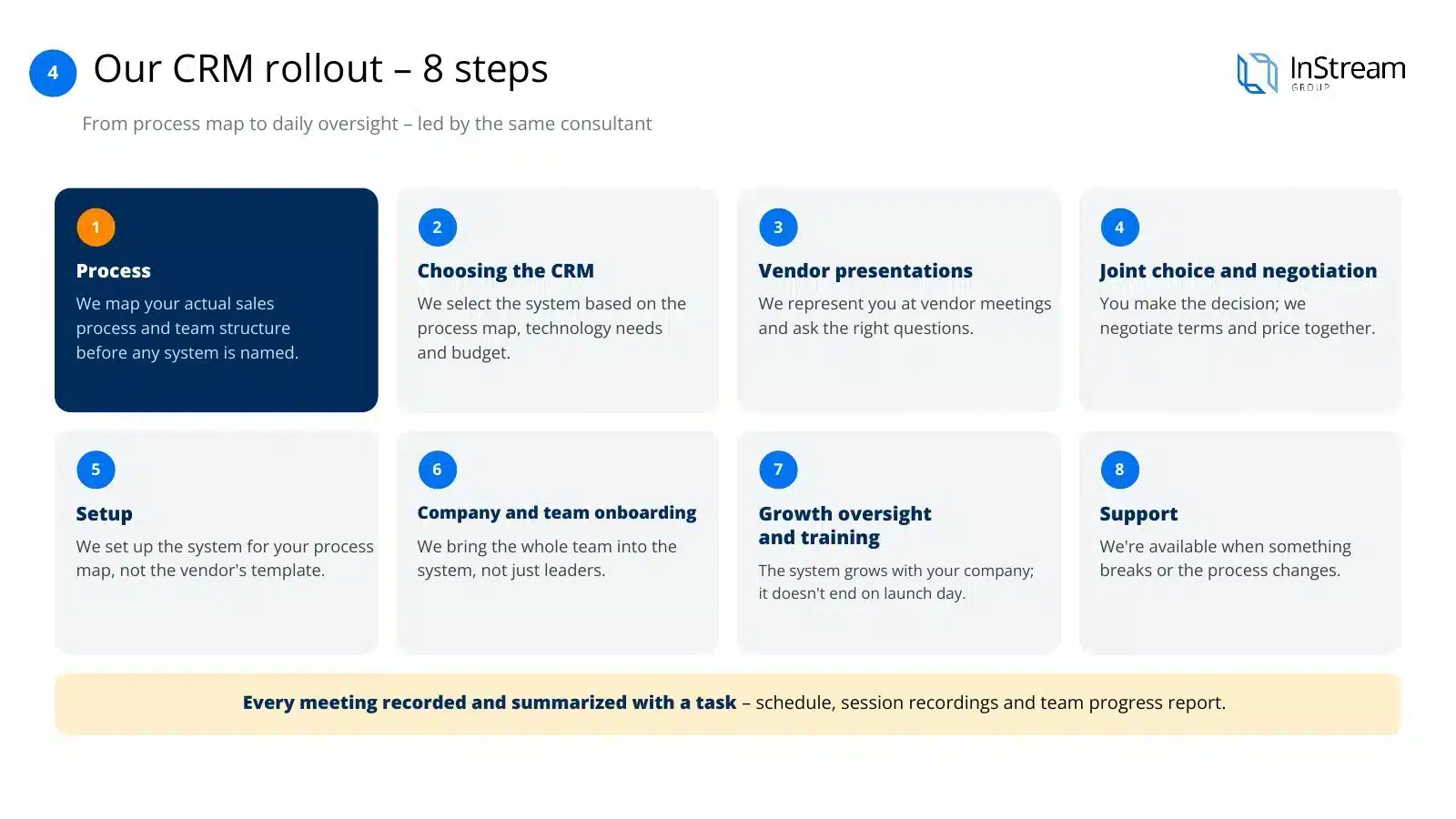
Eight steps, from the process map to day-to-day supervision — run by the same consultant:
- 01
Process
We map your actual sales process and team structure before the name of any system comes up.
- 02
Choosing the CRM tool
We choose the system based on the process map, technology needs and budget — not a predetermined list.
- 03
Vendor presentations
We represent you at meetings with vendors and ask questions you might not ask yourself.
- 04
Joint selection and negotiation
You make the decision, but we negotiate the terms and price together with you.
- 05
Configuration
We set up the system for your process map, not the vendor's default template.
- 06
Onboarding the company and teams
We bring the whole team into the system, not just the leaders.
- 07
Development supervision and training
The system develops together with the company; it doesn't end on launch day.
- 08
Support
We're available when something doesn't work or the process changes.
Partner of 8 CRM systems — why it's an advantage for you
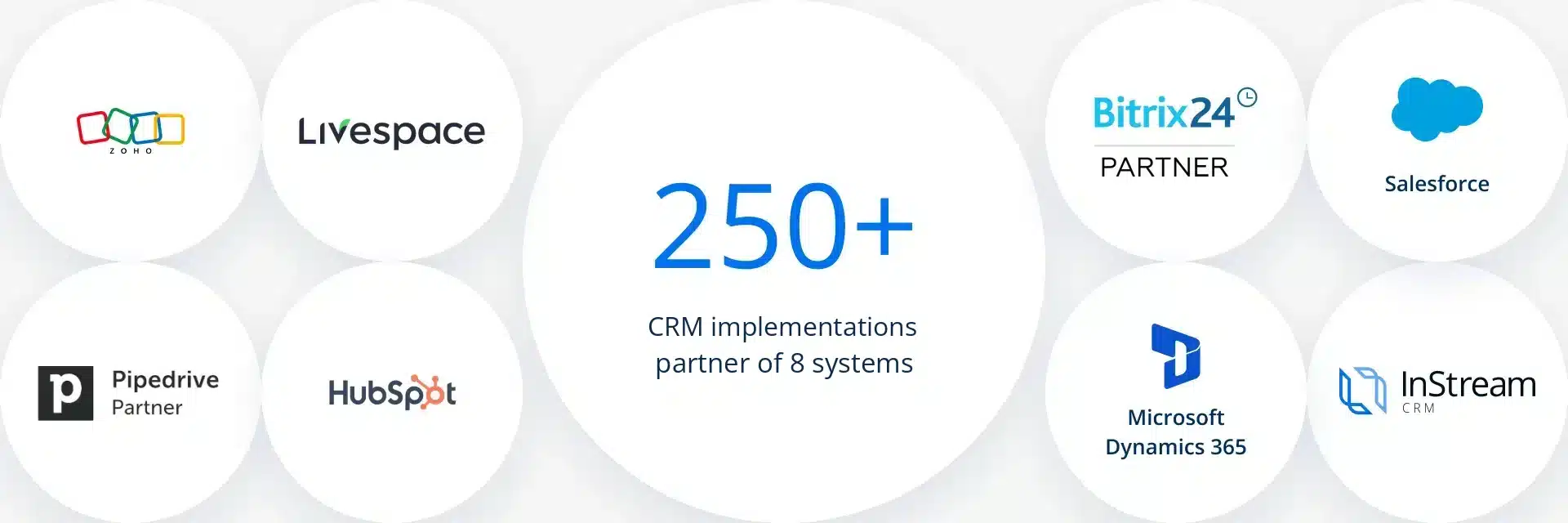
We have been creating software ourselves since 2015 — we're not a reseller of one solution. We're a partner of 8 CRM systems, including a certified partner of Pipedrive, Livespace and Bitrix24. We choose the tool for the client, implement it and negotiate the rates.
Most integrators are tied to one vendor and recommend the same thing to every client — whether or not it fits their process. With us, the choice of system follows from the process map rather than being the starting point.
Our principle
Leads without a CRM and a process are like employees without an office — they sit on the bench. If it turns out the best system for you is the one we earn least on, we'll say so plainly.

We implement top CRM systems
More than 250 CRM implementations and partnerships with 8 systems — including certified partnerships with Pipedrive, Livespace and Bitrix24. We work with systems from SaaS for small teams to Enterprise, so we choose the tool for your process, not for one vendor.
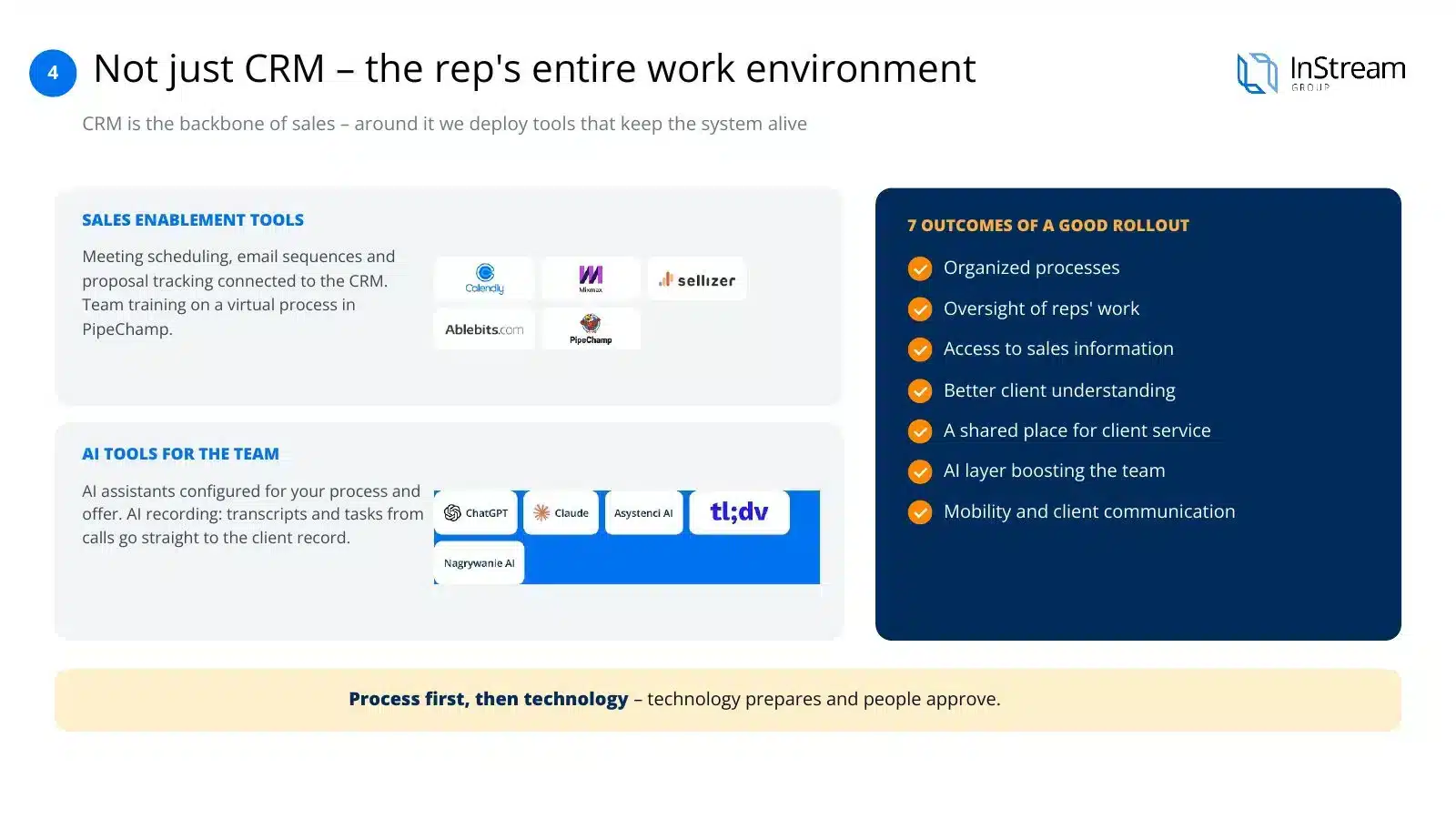
Not just CRM: we implement the salesperson's entire working environment
The CRM is the backbone of sales. Around it we implement tools that streamline the team's daily work and keep the system alive — not just a contact database.
Sales enablement tools
- Meeting booking, email sequences and offer tracking connected to the CRM, instead of five separate apps.
- Automations that take data re-entry and manual follow-ups off the salesperson's plate.
- Team training on a virtual process in PipeChamp — before the salesperson enters real conversations.
AI tools for the sales team
- ChatGPT and Claude configured for your process, offer and way of communicating with clients.
- AI assistants for preparing meetings, offers and follow-ups — on data from your CRM.
- AI recording: transcripts, summaries and tasks from every conversation go straight to the client card.
We implement every tool on the same principle as the CRM: process first, then technology. Technology prepares, a person approves — AI generates message variants, the salesperson chooses and sends. Never the other way round.
CRM implementation results: what to expect
Seven concrete results, if the implementation is done well:
Organised processes
One shared way of working instead of five versions of the same process in salespeople's heads.
Oversight of salespeople's work
The manager sees what's happening in the pipeline instead of asking for a status update at a meeting.
Access to sales information
Data on clients, contact history and opportunities in one place.
Better understanding of clients
The full history of the relationship, not fragments in emails and individual people's memory.
A shared place for client service
Sales and service work on the same data.
AI layer
Strengthening the team's skills in service and sales, not replacing people.
Mobility and client communication
Email and phone connected to the system, working from anywhere.
How much does a CRM implementation cost?
Indicative price ranges on the Polish market, depending on company size and implementation scope:
Micro and small companies
From €3,500 to €11,500
Medium and large companies
From €11,500 to €23,000
Enterprise
Always an individual quote, depending on the scale of integration and number of users
10 reasons why CRM implementations fail
- The company has already chosen a system but doesn't know why that oneThe choice comes from opinions, trade fairs or what competitors have — not from a map of its own process.
- The company has no processes, doesn't want to write them down and implements a CRM “blind”At best, the system replicates the existing chaos instead of organising it.
- The company implements a CRM with an IT firm rather than a consultancy that knows salesThe configuration is technically correct but doesn't match how the team actually sells.
- The system is poorly matched to the organisationToo big for a small company or too simple for a complex process — maintenance costs rise unnecessarily.
- System configuration and company implementation are two different processes — treated as oneSetting up fields doesn't mean the team will start using the system.
- No long-term support after launchThe implementation is treated as a closed project, not a process with development supervision.
- No support for the sales team in using the system day to dayThe team is left alone with the system after one onboarding session.
- No clearly defined KPIs and roles in the system from the very startNobody knows exactly what is to be measured and by whom.
- Managers don't use the system themselves and don't set an example for the teamLeaders know the system least well — and it's from them that the team learns whether the CRM matters.
- The implementation is treated as a one-off project rather than a process with development supervisionThe CRM and the sales process change along with the company — a one-off implementation doesn't cover that.
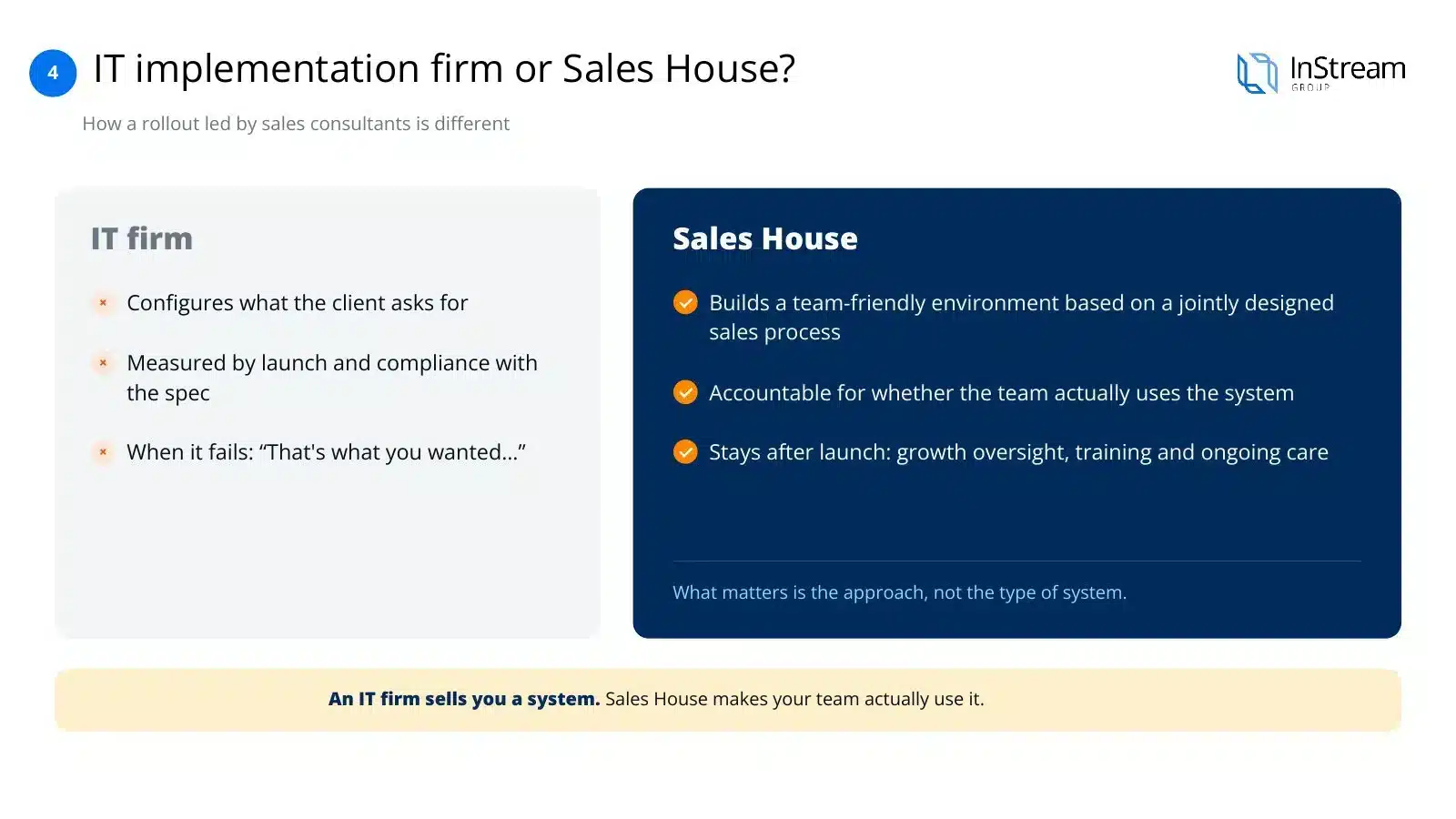
An IT implementation company or a Sales House — how do they differ?
IT company
- Configures what the client asks for
- Is accountable for launch and compliance with the specification
- When something doesn't work: “That's what you asked for...”
Sales House
- Builds a team-friendly environment based on a sales process designed together beforehand
- Is accountable for whether the team actually uses the system, not just whether the system works
- Stays after launch — development supervision, training, oversight
An IT company sells you a system. A Sales House sells you your team actually using it.
How we bill CRM implementation
We bill CRM implementation in the same model as Sales Booster — monthly, with the number of consulting hours matched to the size of the team:
Small implementation
First salesperson
2 months, 12 h of consulting work per month
For a founding team bringing in its first sales hire.
Medium implementation
Founding team + first salesperson
4 months, 14 h of consulting work per month
For growing teams at an early stage.
Large implementation
Sales teams
4 months, 20 h of consulting work per month
For a complete rebuild of sales structures.
Each variant includes: process mapping, system selection and configuration, team onboarding, training and development supervision — not just field configuration.
We prepare the scope and quote for your situation after a short conversation — this isn't a “one size fits all” service.
Clients and their stories
Our clients' success and satisfaction matter most to us. Join more than 1,700 companies worldwide for which we have generated leads.
Case study
Emitel × InStream
Cold Email campaign: boosting in-building mobile network coverage.
105 hot leads350% of the guarantee deliveredClient testimonial
Mr Staff Support
Recruitment of drivers and workers from Asia. Magdalena talks about working with InStream.
Case study
Studio201 × InStream
Cold Email campaign for a software house: apps and AI implementations.
119 hot leads3 signed contractsClient testimonial
Packon
Cardboard packaging manufacturer. Konrad Wijata talks about working with InStream.
Case study
Personal System × InStream
Cold Email campaign for a permanent and temporary staffing agency.
40 hot leads in 3 months17,000+ messagesClient testimonial
Proexwork
Staffing agency. Maciej Krutul talks about working with InStream.
Case study
StethoMe × InStream
LinkedIn: the CEO's personal brand and US market outreach in 4 months.
607 invitations13.5% acceptance rateCase study
Iguana Group × InStream
Cold Email campaign to schools: sports equipment.
43 hot leads419 repliesClient testimonial
HSK Consulting
Employee hiring services. Jarosław Multan talks about working with InStream.
Client testimonial
MAAG Gear
LinkedIn campaign, 2 years of working together. Krzysztof Orłowski talks about working with InStream.
Client stories
See how we help companies like yours
Testimonials, case studies and campaign results from our clients in Poland and around the world.
See client storiesNeed to verify our effectiveness?
We have supported more than 1,700 companies worldwide in sales. During a conversation with our consultant, ask for references or the possibility of business contact with selected clients. Book a presentation of our work or ask us to prepare an initial vision of cooperation.
Check our Google reviews

Despite operating at such a large scale, we keep negative reactions to a minimum. Our positive Google reviews are the best proof of that.
Ask for written references

We have hundreds of recommendations from satisfied clients that confirm the effectiveness of our work. Ask a consultant for examples of projects from your industry and written references.
Talk to our clients

Interested in a specific project? Contact our consultant to get the chance to talk to selected clients. Our business partners are happy to share their experience.
Frequently asked questions — CRM implementation
Do I need to know already which CRM I want to implement?
No — and if you already know, we'll check together whether that choice comes from your process map or from outside opinion.
Do you implement Enterprise systems, e.g. Salesforce or Dynamics 365?
Yes, although in this segment the quote is always individual — the scale of integration and number of users strongly affect the scope of work.
How long does the whole implementation take?
From 2 to 4 months, depending on the variant — from process mapping to full team onboarding.
Is it worth building your own CRM with AI instead of buying a ready-made system?
In most cases, no — lack of support, rising maintenance costs and no integration with email or telephony usually outweigh the apparent savings at the start.
Are you tied to one CRM vendor?
No — we're a partner of 8 systems, including a certified partner of Pipedrive, Livespace and Bitrix24. We choose the system for you, not for our commission.
Do you train the whole team or only the leaders?
The whole team — an implementation that only reaches managers ends with salespeople going back to Excel and email.
Can I implement a CRM if I don't yet have a documented sales process?
That's exactly where we start — process mapping is the first, mandatory stage of every implementation.
What happens after the implementation ends?
We stay on in development supervision — the CRM and sales process change with the company; they don't end on launch day.
What if I already have a CRM but nobody uses it?
A very common scenario — we start by diagnosing why the system didn't work, instead of immediately proposing a migration to another one.
How does this differ from an ordinary IT implementation company?
An IT company is accountable for launching the system according to the specification. We hold ourselves accountable for whether the team actually uses the system.
Will a CRM replace my sales manager?
No — a CRM gives the manager data and oversight of the process, but leaders must use the system themselves to set an example for the team.
How does billing work?
Monthly, in one of three variants matched to the size of the team and the scope of implementation. We prepare an exact quote after a diagnostic call.
Our CRM
We have our own CRM and the world writes about it
We develop our own CRM system for salespeople. See how users rate it on G2 and Capterra and what the business media write about us.
User ratings
A CRM system for salespeople
A tool for running the sales department, working with leads and client relationships, developed by InStream Group.
See our CRMSources: g2.com (InStream Group) and capterra.com (InStream), as of 1 November 2026. Ratings change as new reviews come in.
Articles


Before you choose a system, choose your approach to implementation
A diagnostic call shows what stage you're at and what you actually need — before the name of any CRM comes up.