
AI in sales implementations · process, CRM, team
AI in sales implementation
We implement an AI layer in companies that supports the sales department. Thanks to 10 years of experience, we know how to support an organisation through this process. InStream Group is the first Sales House to support your sales and lead generation.
Trusted by 1,700 companies from Poland and around the world
Starting point
Where are you with AI today?
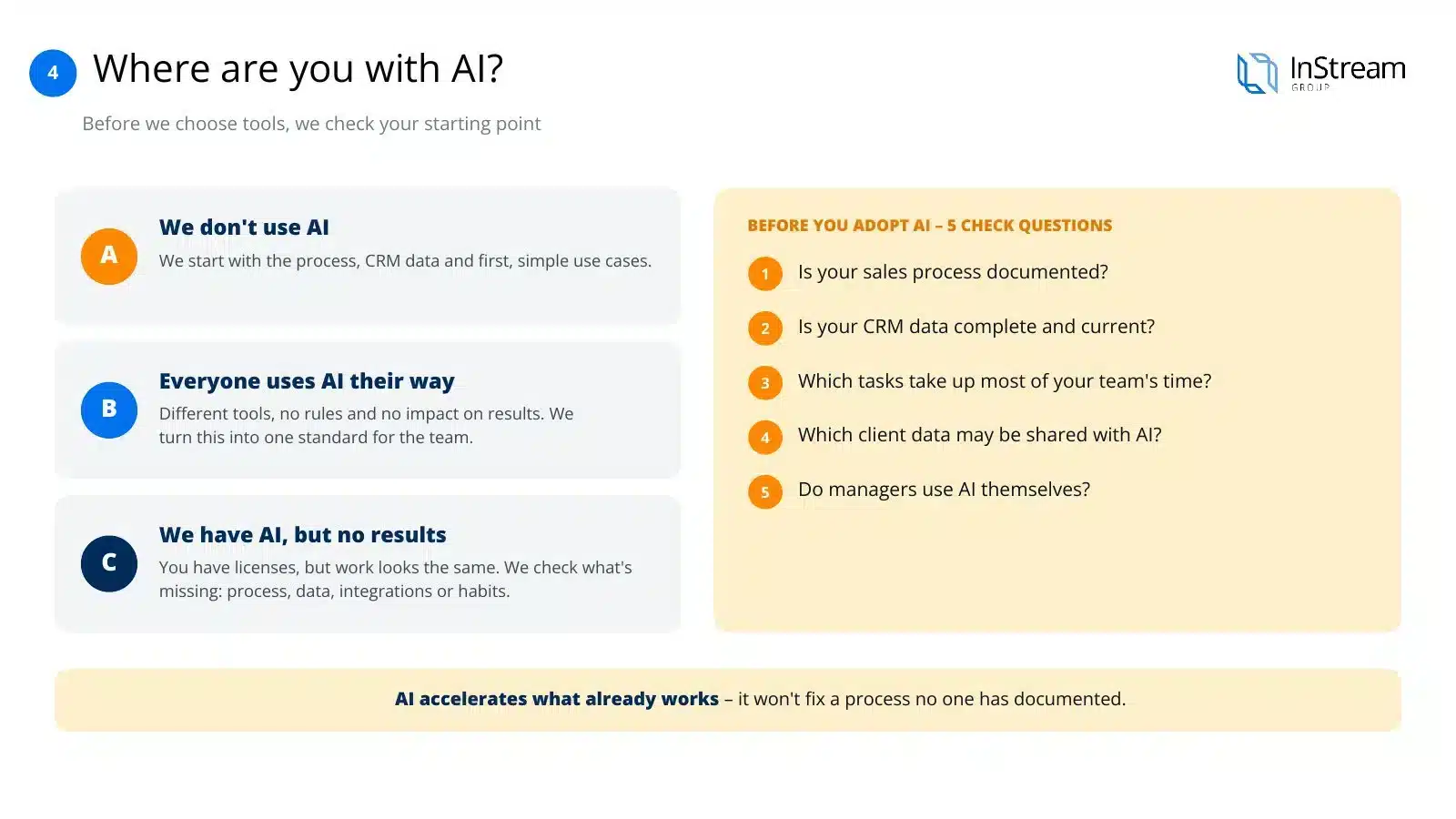
Before we choose tools, we check where you’re starting from. Your situation determines how the AI implementation goes.
A · We don’t use AI
Salespeople work the old way and AI is a new topic for you. We start with the process, CRM data and the first, simple use cases.
B · Everyone uses AI their own way
Salespeople use different tools on their own, without rules and without impact on results. We bring it into one standard for the team.
C · We have AI, but we don’t see results
You have licences, but the work looks the same. We check what’s missing: process, data, CRM integration or team habits.
Presentation
See how we implement AI in sales
Twelve slides: why AI implementations disappoint, the four layers of AI in a company, an example of AI connected to a CRM, eight implementation steps and how billing works.
Arrows, swipe or click a thumbnail
Voice-over script for this slide
Artificial intelligence can genuinely take the load off your sales department. We implement it on your process and your CRM data so it works for the team every day.
Buying licences alone rarely changes the way a team works. AI speeds up what already works, so without a documented process and good data it produces random results. We start by organising sales and only then build the AI layer on top.
Before we choose tools, we check where your company is. Sometimes we start from scratch, sometimes we organise tools that everyone uses their own way. A short diagnosis shows what’s missing for artificial intelligence to start delivering results.
We build the AI layer gradually. First it takes over repetitive tasks, then it strengthens the team’s skills and communication. Finally we connect it to the CRM so it works within your sales process instead of alongside it.
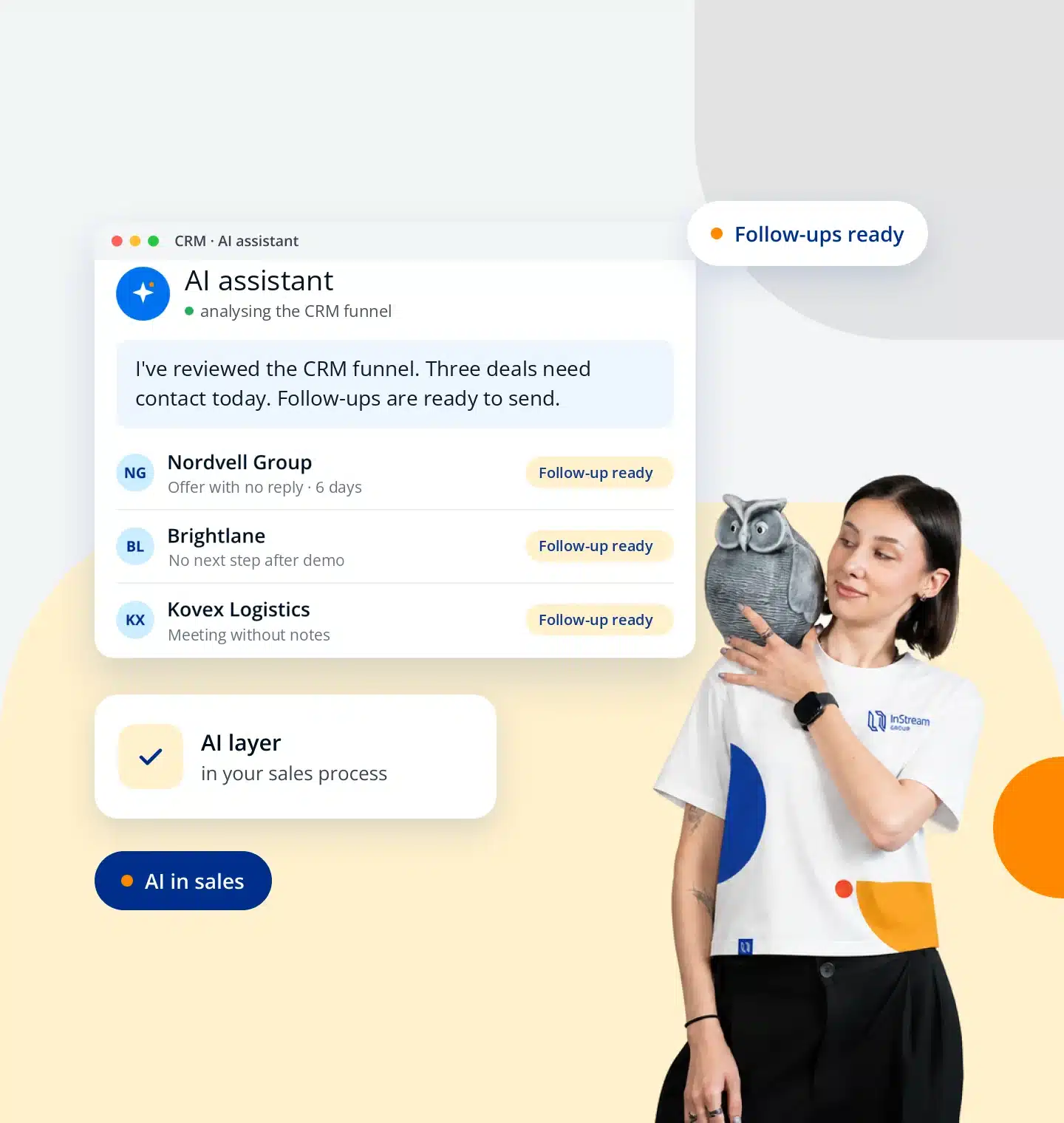
An AI assistant connected to the CRM works on real data from the sales pipeline. Every morning the salesperson gets a short plan: who to talk to, about what and with what next step. Our own sales team uses such a solution every day.
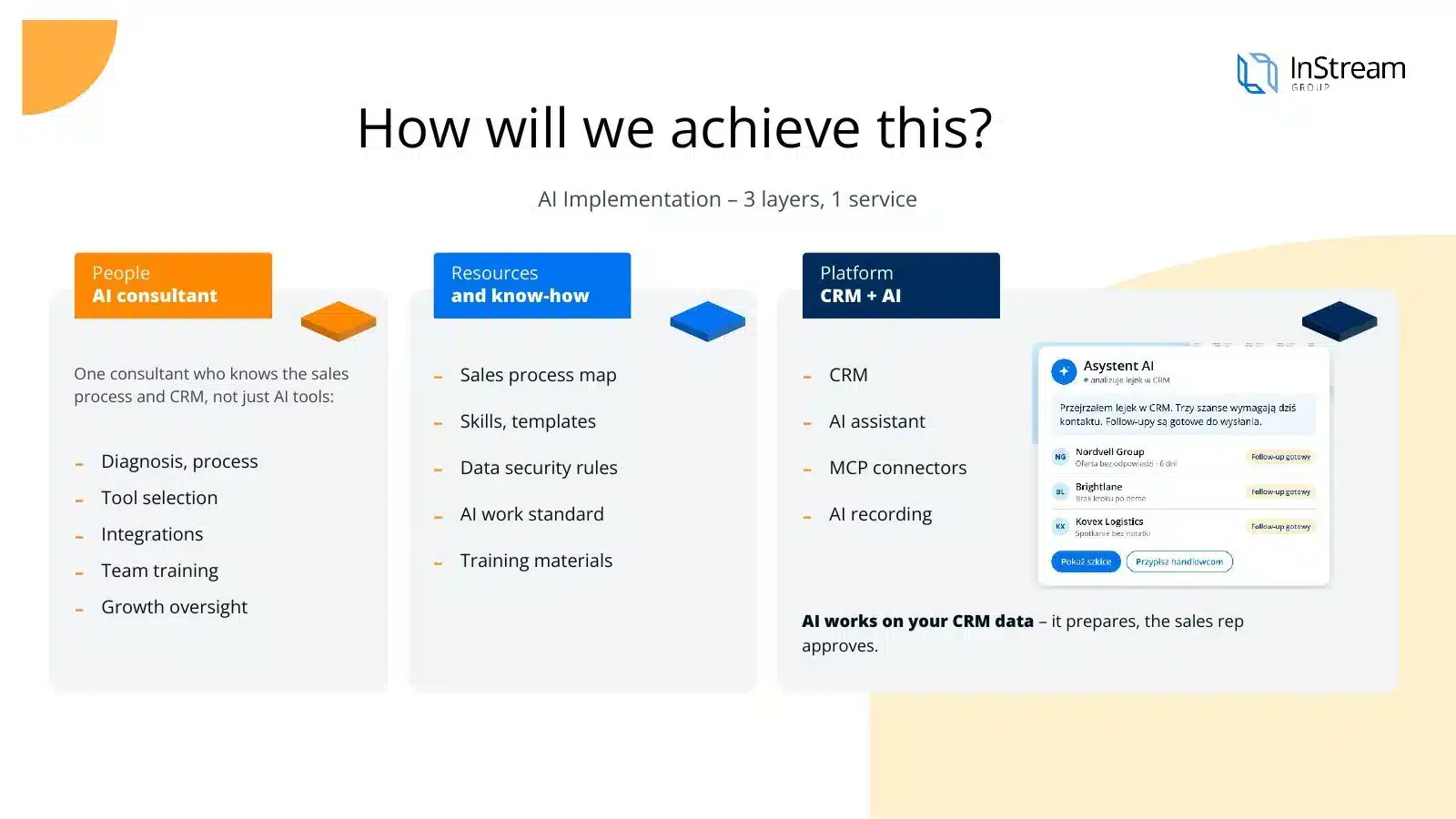
The implementation is run by one consultant who knows the sales process and the CRM, not just AI tools. You get ready AI skills, data security rules and a working standard for the team. AI prepares materials, but the salesperson always makes the decision.
AI relieves salespeople fastest where they lose the most time: on offers, meeting notes and preparing for conversations. The manager sees the risks in the pipeline sooner. We tailor each AI skill to your offer and way of communicating.
The AI tools market changes very quickly, so we start the selection with the tasks in your process. We take into account CRM integration, data security, quality of work in Polish and costs. That way you pay for tools that genuinely support the team.
The same consultant runs the whole project: from the process map, through integrations, to day-to-day supervision. We teach the whole team to work with AI, not just the leaders. At every stage, technology prepares the material and a person approves it.
AI works best in a well-organised working environment. That’s why, alongside it, we organise the CRM and sales tools and train the team in PipeChamp. Salespeople gain more time for conversations with clients.
An IT company launches a tool and bills for the installation. We know a salesperson’s work, so we build AI on the sales process and hold ourselves accountable for whether the team really uses it. After launch we stay with you and develop further use cases.
We bill AI implementation monthly. You can start with a pilot in one team or cover the whole organisation straight away. We’ll prepare the scope and quote after a short diagnostic call.
Before you implement AI: do you have a process and data?
Before anyone asks which AI to choose, they should ask: do we have a documented sales process and an orderly CRM? AI speeds up what already works. It won't fix a process nobody has described.
Why it matters so much: AI without a process and data is a fast assistant with no knowledge of the company. It can write, summarise and analyse, but if it doesn't know your process and clients, its work will be random.
Reversing the order
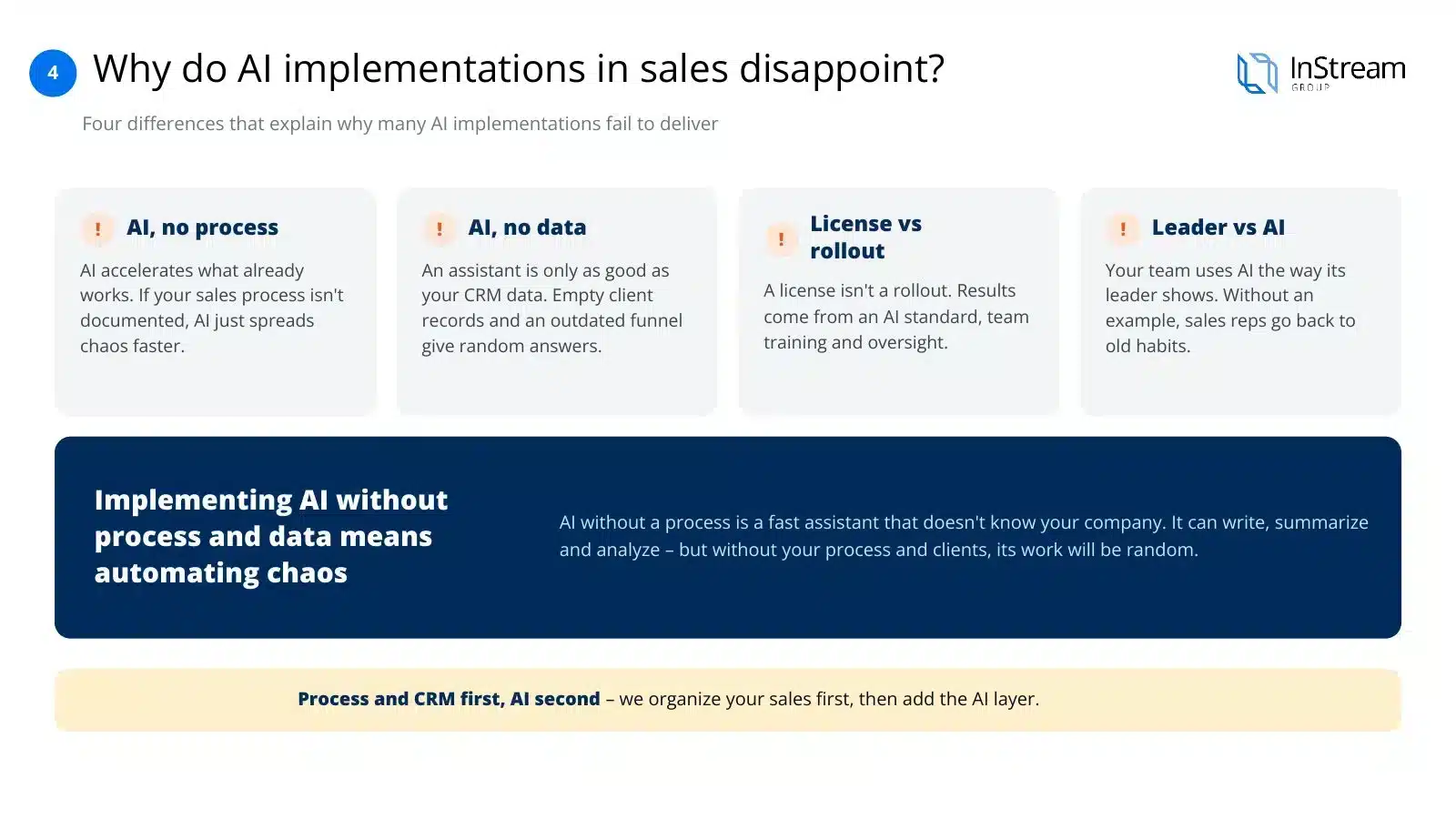
Implementing AI without a process and data means automating chaos. First we organise sales and the CRM, and only then add the AI layer.
Implementation layers
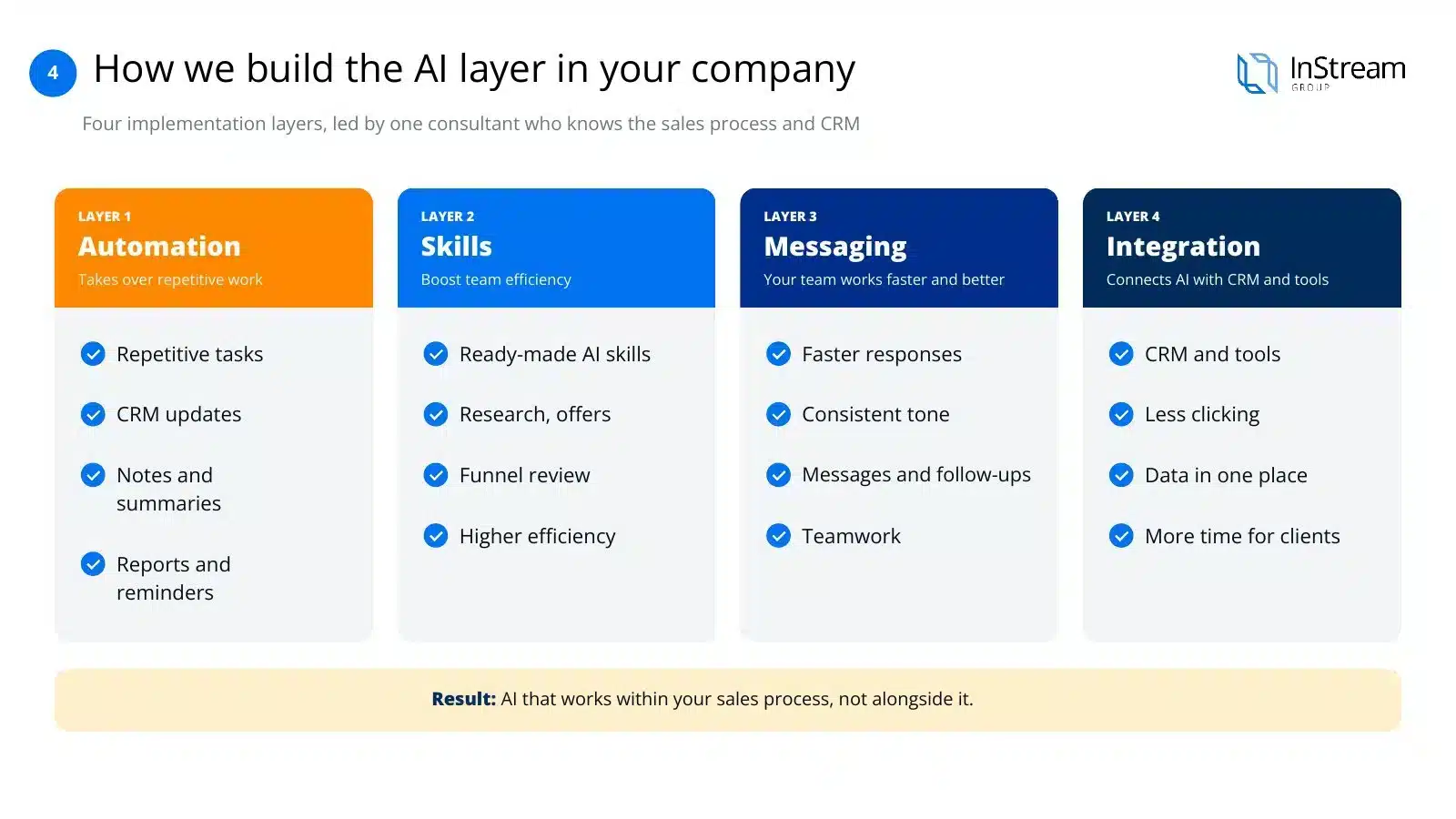
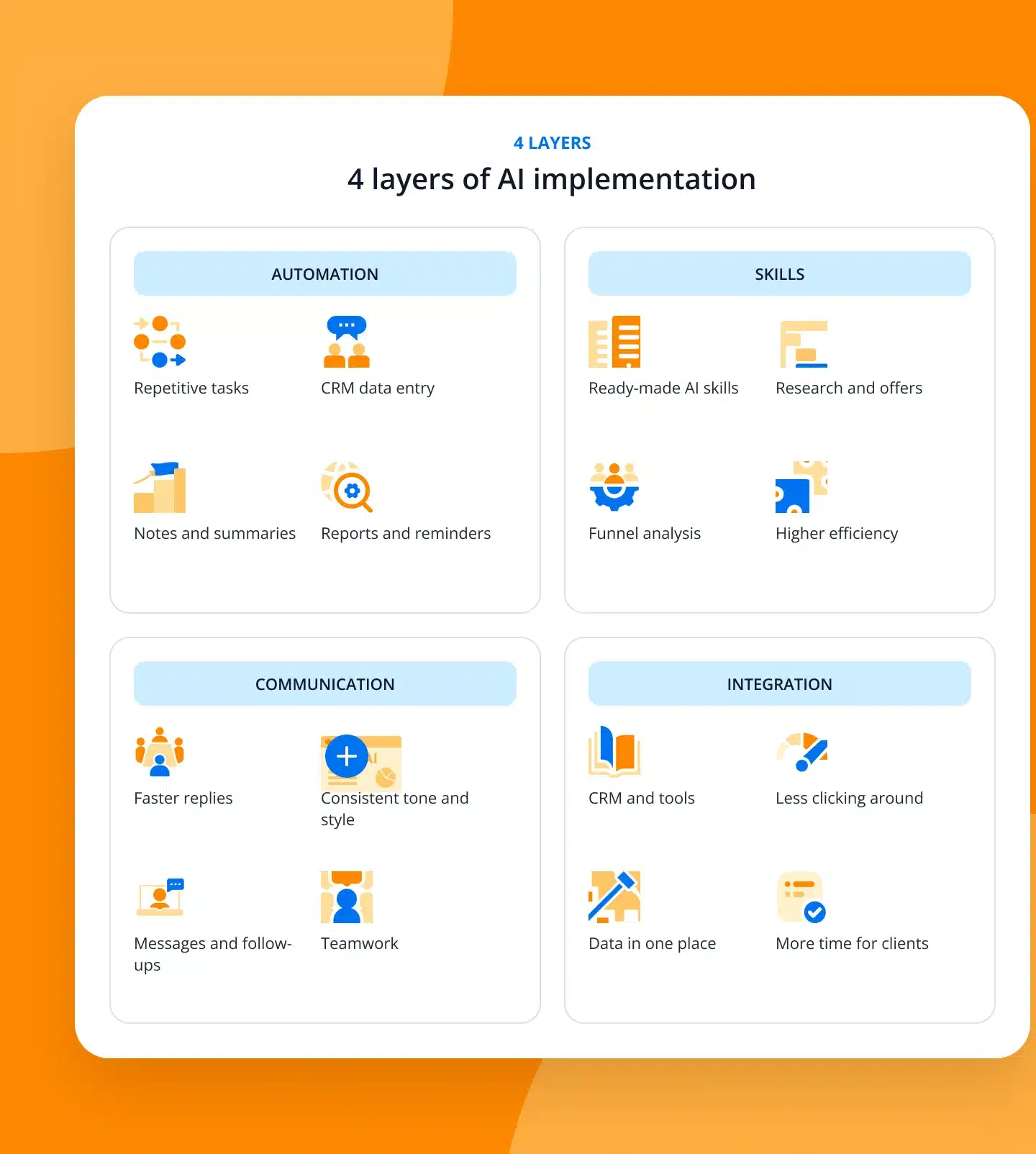
How we build the AI layer in your company
Automation takes over what is repetitive. Skills increase every employee's efficiency. Communication makes the team work faster and more effectively. Integration connects AI with the CRM and tools to cut unnecessary activity and focus on the client.
From day one your company is guided by the same consultant, who knows the sales process and the CRM, not just AI tools.
Result
AI that works within your sales process, not alongside it.
A real-life example
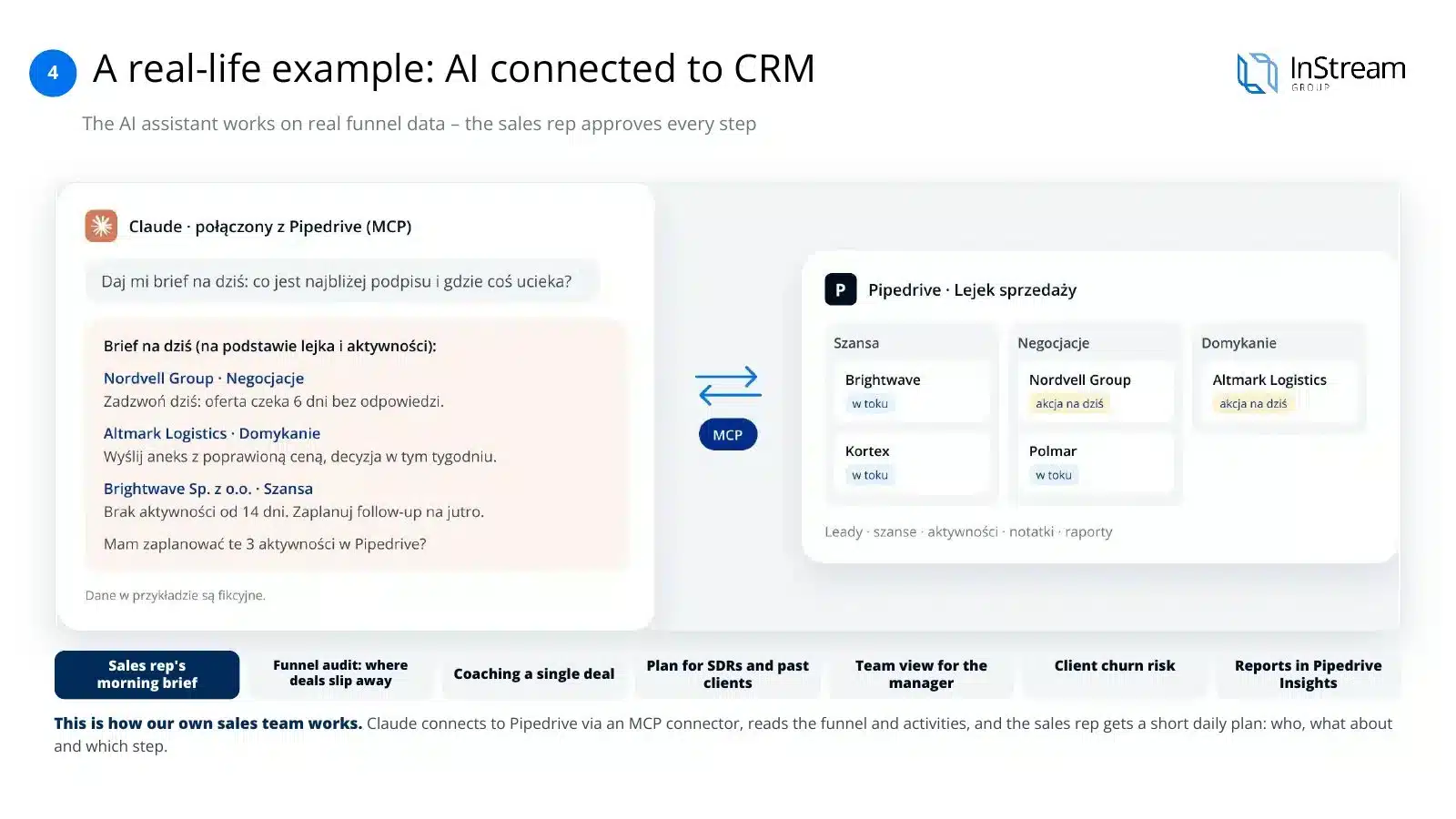
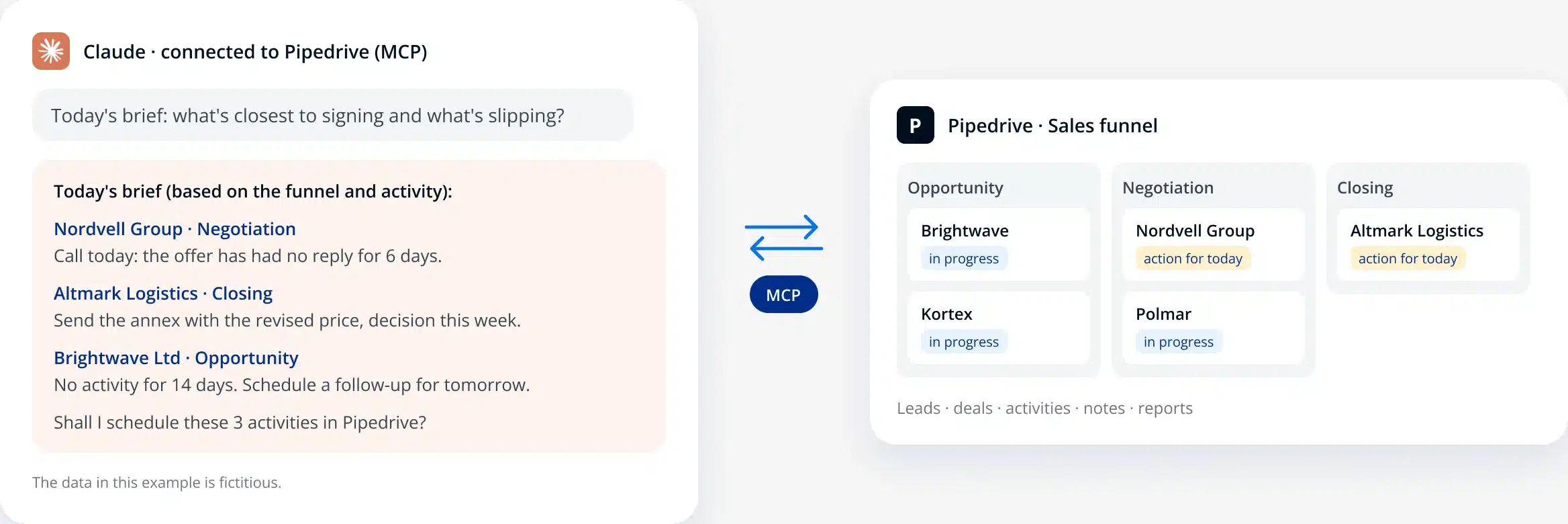
Example: connecting Claude with Pipedrive
This is how our own sales team works. Claude connects to Pipedrive via an MCP connector, reads the pipeline and activities, and the salesperson gets a short plan for the day: who, about what and with what next step.
Use cases
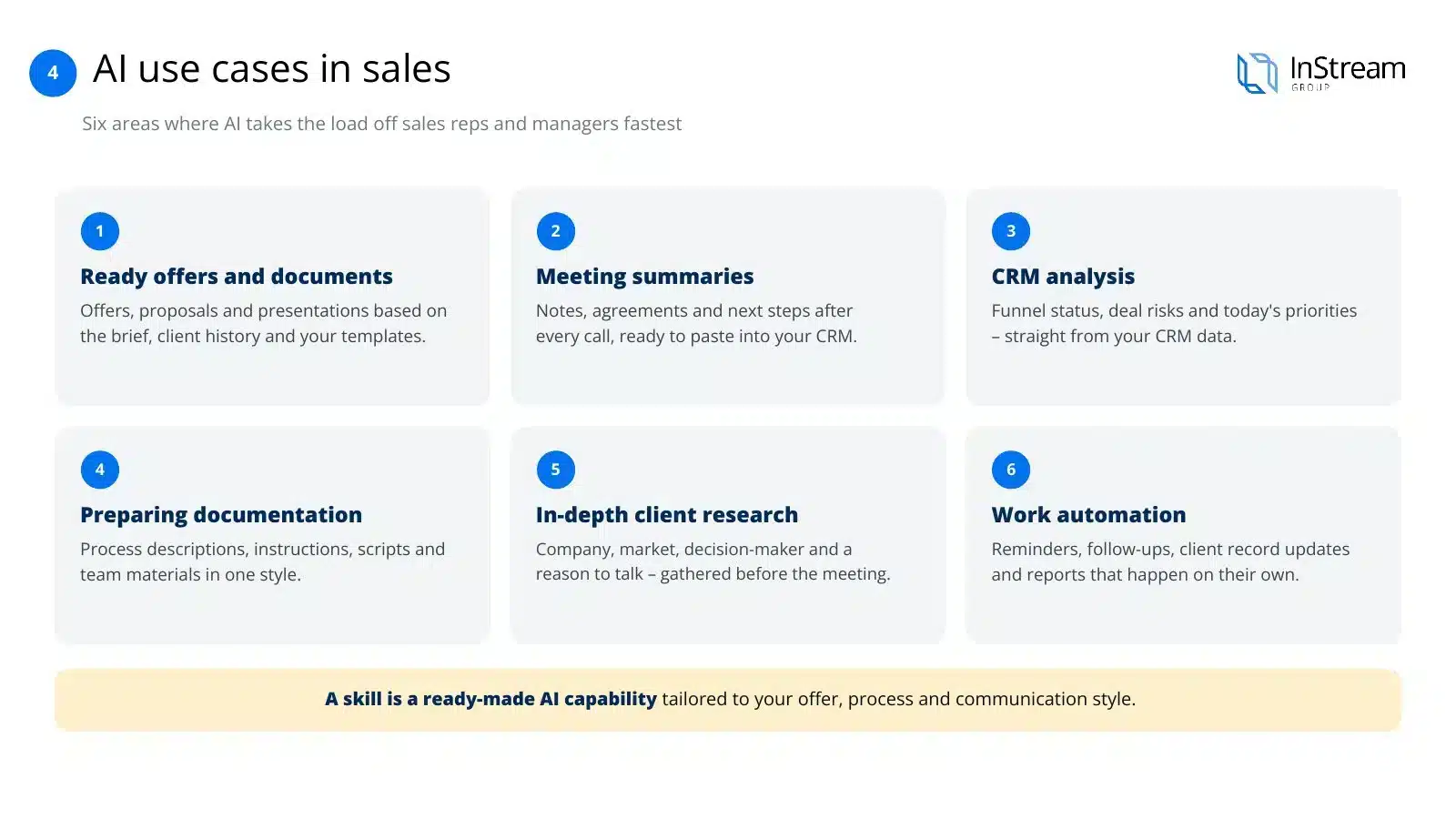
AI use cases in sales
Six areas where AI relieves salespeople and managers fastest.
Ready offers and documents
Offers, proposals and presentations prepared from the brief, the client's history and your templates.
Meeting summaries
Notes, agreements and next steps after every conversation, ready to paste into the CRM and send to the client.
CRM analysis
Pipeline status, risks in opportunities and today's priorities, drawn straight from CRM data.
Preparing documentation
Process descriptions, instructions, scripts and materials for the team in one consistent style.
Deep client research
The company, market, decision-maker and reason to talk, gathered in a few minutes before the meeting.
Work automation
Reminders, follow-ups, client card updates and reports that happen on their own.
Process and CRM first, then AI
Four differences that explain why many AI implementations end in disappointment:
AI without a process
AI speeds up what already works. If the sales process isn't documented, AI just replicates the chaos faster.
AI without data
An assistant is only as good as the data in the CRM. Empty client cards and an outdated pipeline produce random answers.
Licence vs implementation
Buying a licence isn't an implementation. Results only come from a standard for working with AI, team training and supervision in the first months.
Leader vs AI
The team uses AI the way the leader shows. If the manager doesn't work with AI, salespeople quickly go back to old habits.
How to choose AI for your company — 5 criteria
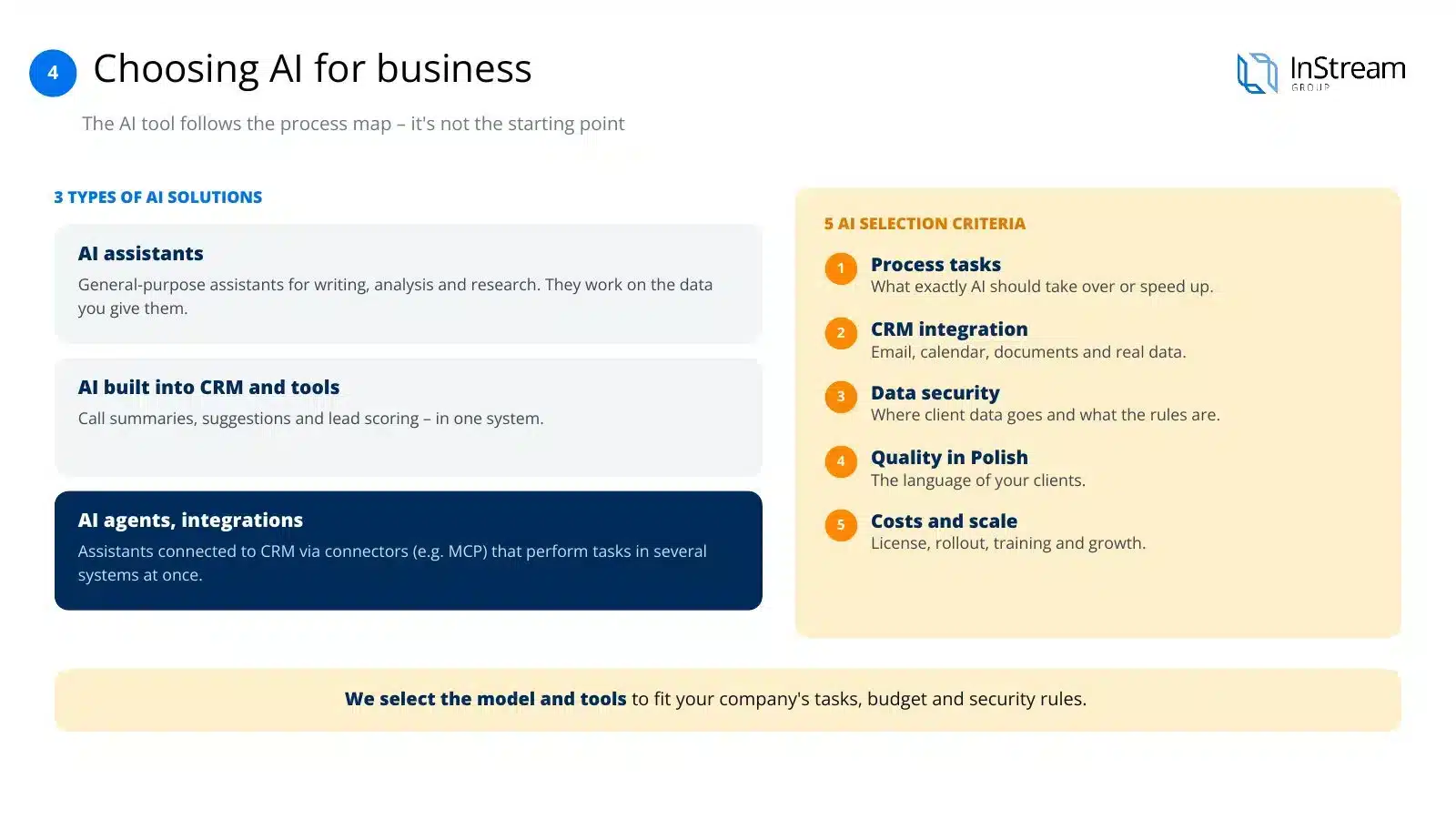
Choosing an AI tool is the result of a process map, not the starting point. Once you know which tasks it should support, you evaluate solutions against five criteria:
Tasks in the process
Which specific tasks in your sales AI should take over or speed up, not what it can do in theory.
CRM integration
Whether the AI will connect to your CRM, email, calendar and documents so it works on real data.
Data security
Where client data goes, whether the vendor trains models on it and what rules it has for businesses.
Quality of work in your language
How the model writes, summarises and analyses in the language you use to talk to clients.
Costs and scale
Not just the licence, but implementation, team training and the cost of growing with the company.
Types of AI and vendors
Three categories of solutions worth choosing between consciously:
AI assistants (language models)
General-purpose assistants for writing, analysis and research, e.g. Claude (Anthropic), ChatGPT (OpenAI), Gemini (Google) or Copilot (Microsoft). They work on the data you give them.
AI built into CRMs and tools
AI features in CRM systems, email and meeting tools: call summaries, suggestions, lead scoring. They work within one system.
AI agents and integrations
Assistants connected to the CRM and other tools via connectors (e.g. MCP) that carry out tasks across several systems at once: from research to updating the pipeline.
Market direction
What sales will look like in 2027: with AI and without AI
AI won't replace salespeople, but teams that implement it well will work differently from those that stick with old methods.
| Area | Sales without AI | Sales with well-implemented AI |
|---|---|---|
| Salesperson's time | Most of the day spent on non-sales tasks: notes, CRM, reports. | AI takes over repetitive tasks, leaving more time for conversations with clients. |
| Meeting preparation | Searching for information manually, often at the last minute. | Research on the company and the contact ready before every meeting. |
| CRM data | Incomplete, updated late. | Notes and next steps go into the CRM after every conversation. |
| Communication | Everyone writes their own way, with uneven quality of offers and messages. | A consistent style and templates across the company, faster replies. |
| Management | The manager compiles reports manually and reacts after the fact. | Pipeline analyses on demand and earlier risk signals. |
| Buyers | Buyers increasingly research on their own, more and more often with the help of AI. | The company is visible where the client searches, including in AI answers. |
By 2028, AI agents in sales will outnumber salespeople 10 to 1.
of their time salespeople spend on tasks unrelated to selling.
of teams with AI saw revenue growth, compared with 66% of teams without AI.
higher chance of return on AI for leaders who rebuild data, automation and user experience.
Skills
Top AI skills for salespeople
The most common uses of AI in a salesperson's work, according to market reports and what we implement for clients. A skill is a ready-made AI capability tailored to your process.
| # | Skill | What it does | How much it helps |
|---|---|---|---|
| 1 | Automating manual tasks | Updates the CRM, notes and schedule without re-entering data. | approx. 2 h 15 min a day per salesperson (HubSpot) |
| 2 | Messages to prospects | Prepares personalised emails and LinkedIn messages. | approx. 2 h 7 min a day (HubSpot) |
| 3 | Draft inbox replies | Prepares replies for the salesperson to approve. | 10–15 h a week for an Anthropic seller (Anthropic) |
| 4 | Account research | Gathers information about the company, market and contact before reaching out. | faster preparation for the first conversation |
| 5 | Meeting preparation and summary | An agenda before the conversation, a note and next steps after it. | no more manual notes |
| 6 | Pipeline analysis and forecasts | Points to the opportunities closest to signing and where the pipeline is leaking. | decisions based on data, not intuition |
| 7 | Offers and documents | Creates an offer from the brief, the client's history and the company template. | consistent offers in less time |
Sources: HubSpot, “Smarter Selling with AI” (2023): the average salesperson saves more than 2 hours a day after implementing AI tools. Anthropic, “How one Anthropic seller rebuilt his team’s workflows with Claude Code” (June 2026). Other effects are given without figures, as they depend on the company's process.
Technology
We back Anthropic and Claude
We build the AI layer for sales teams primarily on Claude, Anthropic's model. We work with it ourselves every day: in sales, in the CRM, in content and in data analysis.

Anthropic and Claude are trademarks of Anthropic PBC.
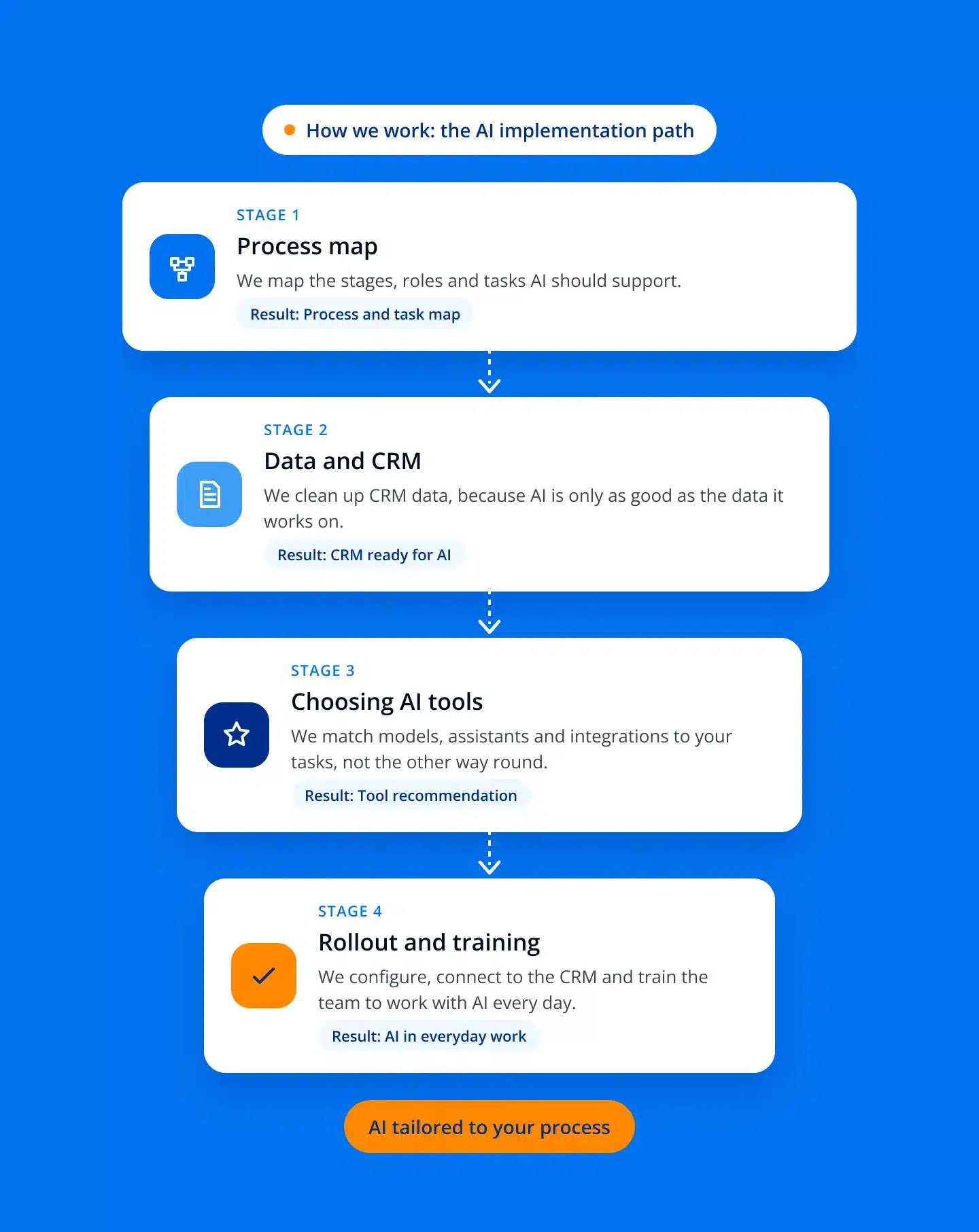
How we implement AI at InStream — 8 steps
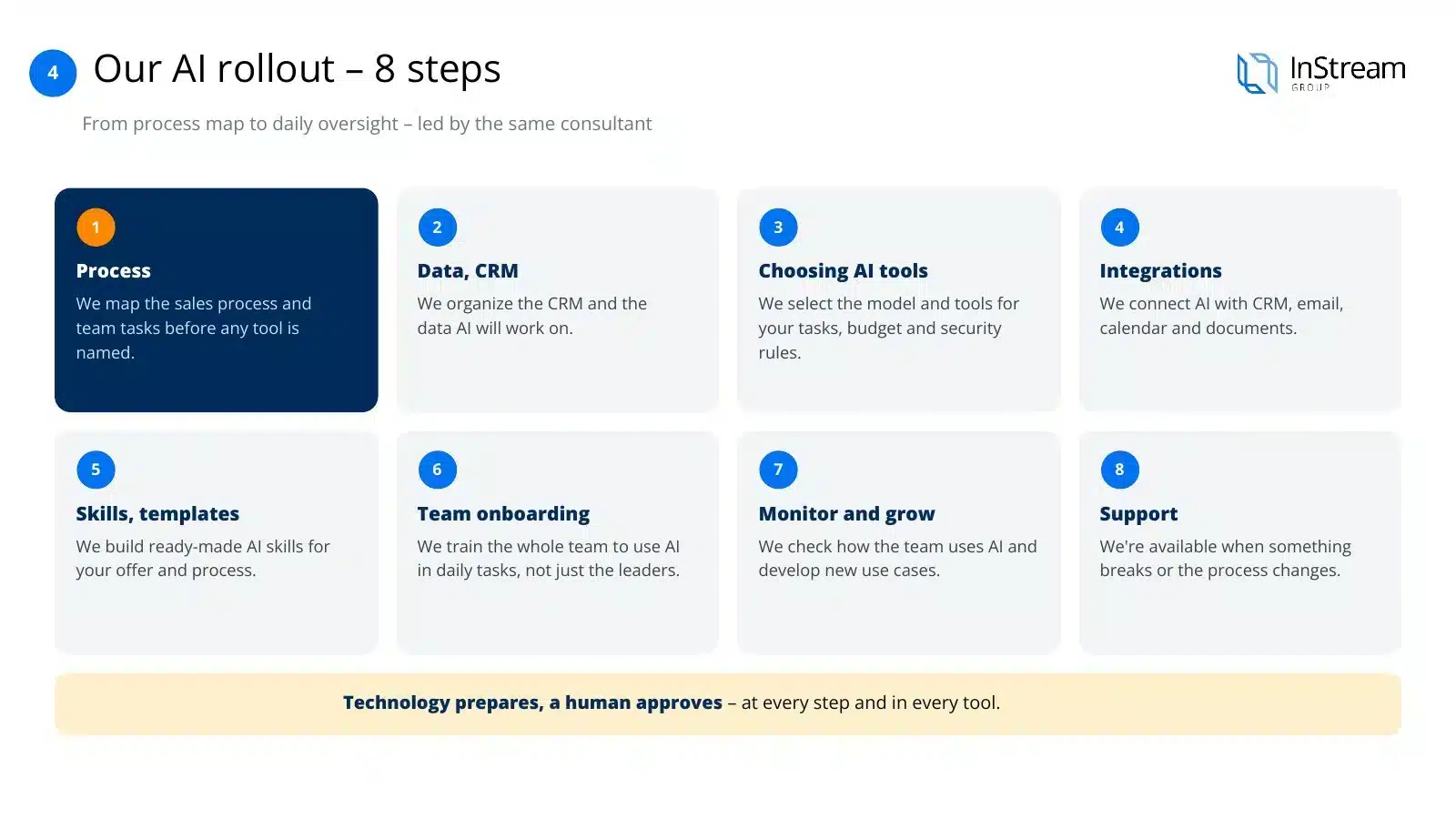
Eight steps, from the process map to day-to-day supervision, run by the same consultant:
Process
We map the sales process and the team's tasks before the name of any tool comes up.
Data and CRM
We organise the CRM and the data AI will work on.
Choosing AI tools
We match the model and tools to the tasks, budget and security rules in the company.
Integrations
We connect AI with the CRM, email, calendar and documents.
Skills and templates
We build ready-made AI skills for your offer, process and way of communicating.
Team onboarding
We teach the whole team to work with AI on their day-to-day tasks, not just the leaders.
Supervision and development
We check how the team uses AI and develop further use cases.
Support
We're available when something doesn't work or the process changes.
InStream + Anthropic
Why we back Anthropic and what it gives your company
We choose technology we trust ourselves in daily work with client data. Here's what Anthropic provides and what we add.
Safety first
From the outset Anthropic has focused on safe and predictable AI. For a company, this means less risk when working with client data.
Company data doesn't train models
On commercial plans (Claude Team, Enterprise and API), Anthropic doesn't use conversations to train models, except where the company itself has opted in.
Quality of work in Polish
Claude writes, summarises and analyses well in Polish, so offers, messages and notes sound natural to your clients.
Connection to your tools
MCP connectors link Claude with the CRM (e.g. Pipedrive or HubSpot), email, calendar and documents, so AI works on real data.
Projects and skills for the team
Knowledge of the offer, process and communication style recorded once and available to the whole team as ready-made skills.
Proven in sales
Anthropic's own sales teams work with Claude: from research and the inbox to updating the CRM and preparing for meetings.
And what does InStream add?
The sales process, an orderly CRM, skills tailored to your offer, integrations, team training and development supervision. The technology comes from Anthropic, the sales implementation comes from us.
Source of data policies: Anthropic Privacy Center, “Will Anthropic train on my inputs and outputs?”. Anthropic and Claude are trademarks of Anthropic PBC.
Not just AI: we implement tools too
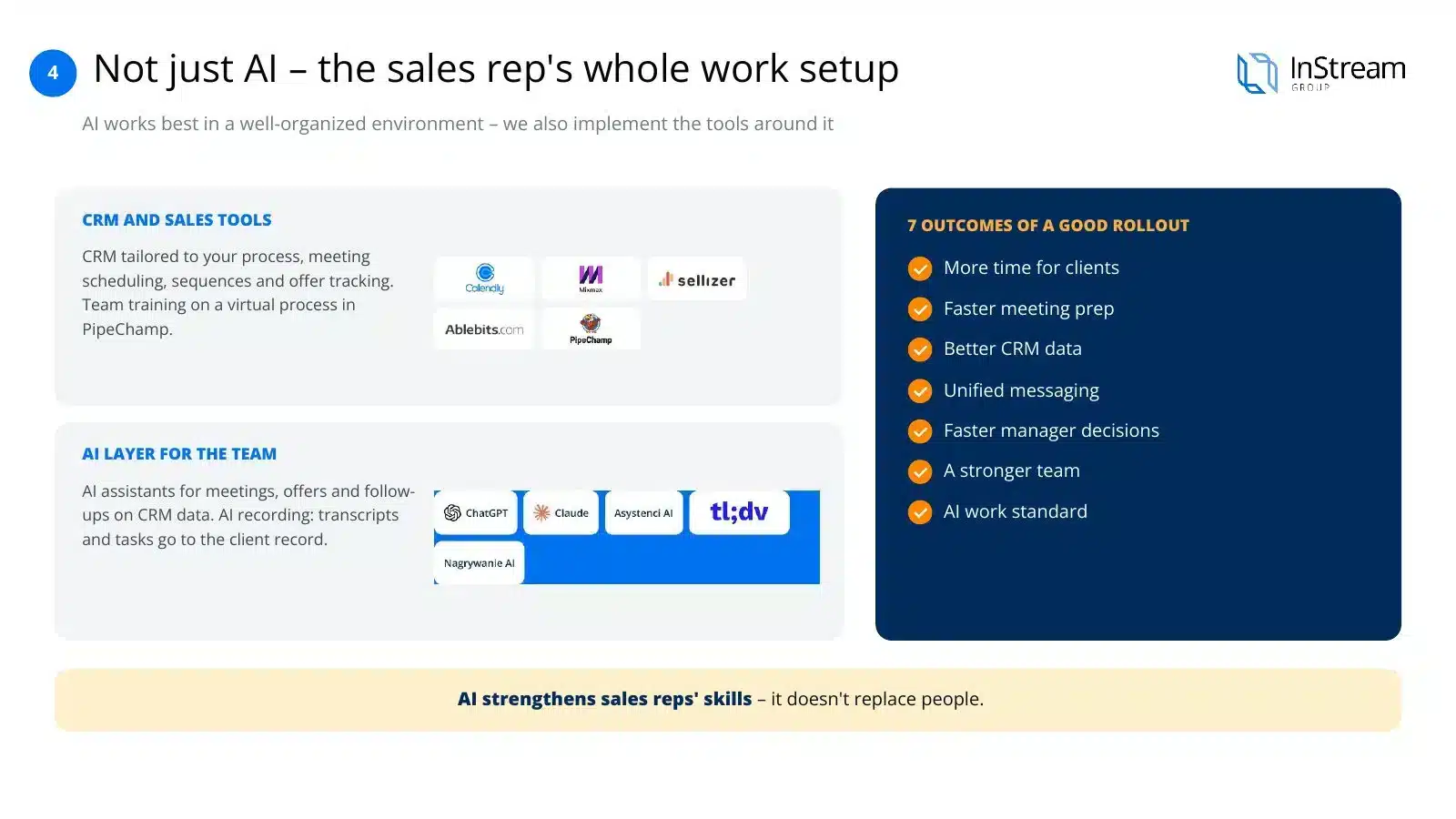
AI works best in a well-organised environment. Around it we implement tools that streamline the team's daily work.
CRM and sales tools
- A CRM matched to the process, with meeting booking, sequences and offer tracking connected to it instead of five separate apps.
- Automations and integrations (e.g. Zapier, MCP connectors) that take data re-entry off the salesperson's plate.
- Team training on a virtual process in PipeChamp, before the salesperson enters real conversations.
An AI layer for the sales team
- Claude configured for your process, offer and way of communicating with clients.
- AI assistants for preparing meetings, offers and follow-ups on data from your CRM.
- AI recording: transcripts, summaries and tasks from conversations go to the client card.
We implement every tool on the same principle: process first, then technology.
AI implementation results: what to expect
Seven results, if the implementation is done well:
More time for the client
AI takes over repetitive tasks and the salesperson focuses on conversations and relationships.
Faster meeting preparation
Research on the company and the contact ready in a few minutes, not after an hour of searching.
Better CRM data
Notes, summaries and next steps go into the CRM without manual re-entry.
Consistent communication
Offers, messages and follow-ups in one style and tone across the company.
Faster manager decisions
Pipeline analyses and reports on demand instead of compiling data by hand.
A stronger team
AI strengthens salespeople's skills rather than replacing people.
A standard for working with AI
One set of rules, skills and templates for the whole team instead of random tools.
How much does an AI implementation cost?
The cost depends on team size, number of integrations and scope of training. It consists of three elements:
AI licences
Depending on the number of users and the chosen plan
Implementation and integrations
Depending on the number of systems and scope of work
Training and supervision
Always an individual quote, matched to team size and implementation time
10 reasons why AI implementations fail
The company buys a tool before it knows what it's for
The choice comes from hype or from what competitors have, not from tasks in the sales process.
The company has no documented sales process
AI automates the chaos instead of organising it.
CRM data is incomplete or outdated
The assistant works on bad data and gives random answers.
Every salesperson uses AI their own way
No standard, templates or rules, so results are uneven and unmeasurable.
Buying licences treated as an implementation
Access to a tool doesn't mean the team will start using it.
No integration with the CRM and tools
The salesperson copies data between windows, so AI costs time instead of saving it.
No training on real tasks
The team is left alone with the tool after a single, general training session.
No data security rules
Nobody knows what data may be passed to AI, so the team either takes risks or doesn't use it.
Managers don't work with AI themselves
The team learns from the leader whether AI matters.
Implementation as a one-off project
AI and the sales process change along with the company, so ongoing development supervision is needed.
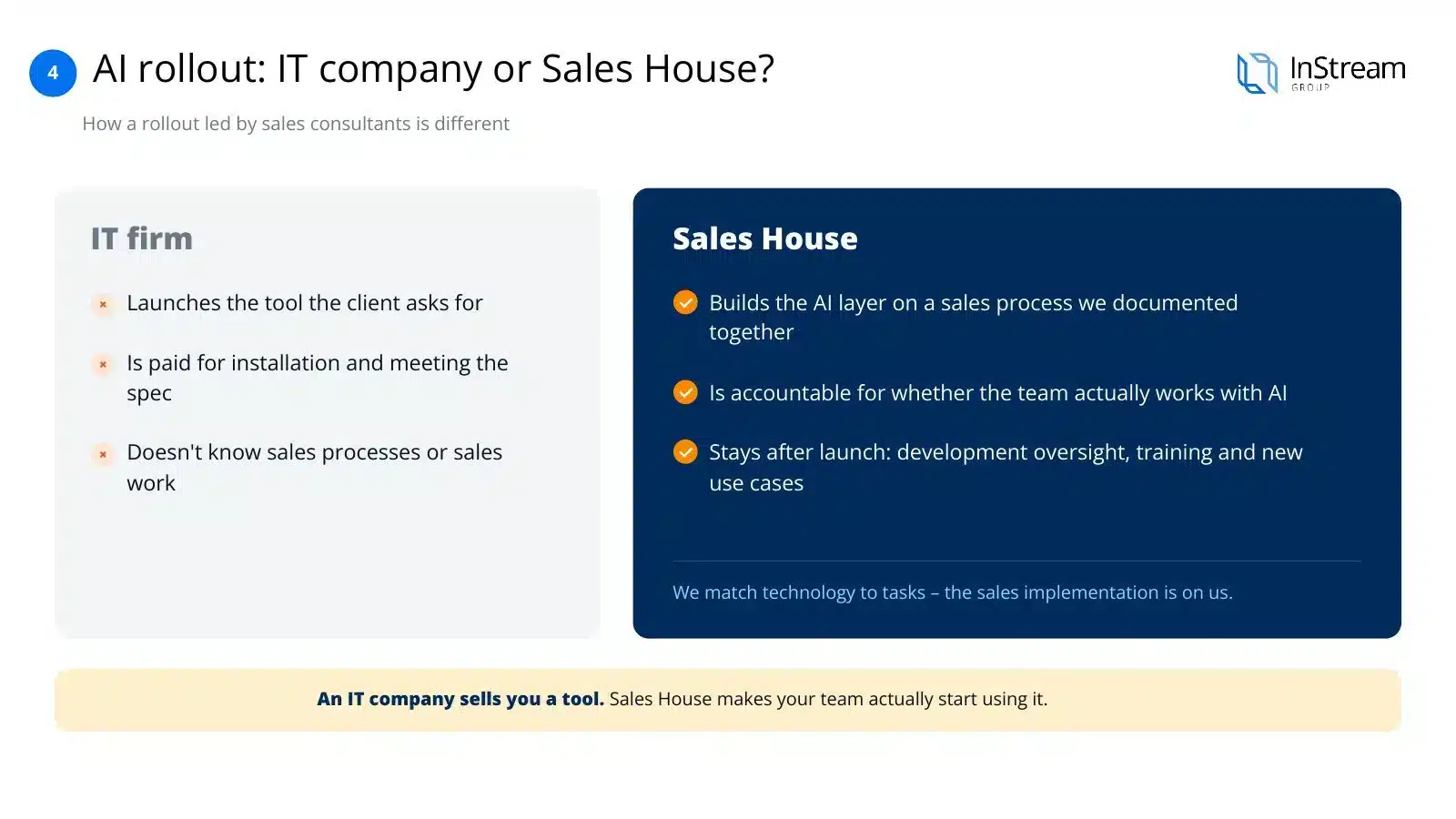
AI implementation: an IT company or a Sales House?
IT company
- Launches the tool the client asks for
- Is accountable for installation and compliance with the specification
- Doesn't know the sales process or a salesperson's work
Sales House
- Builds the AI layer on a sales process we've documented together beforehand
- Is accountable for whether the team actually works with AI, not just whether the tool works
- Stays after launch: development supervision, training and new use cases
An IT company sells you a tool. A Sales House makes your team start using it.
How we bill AI implementation
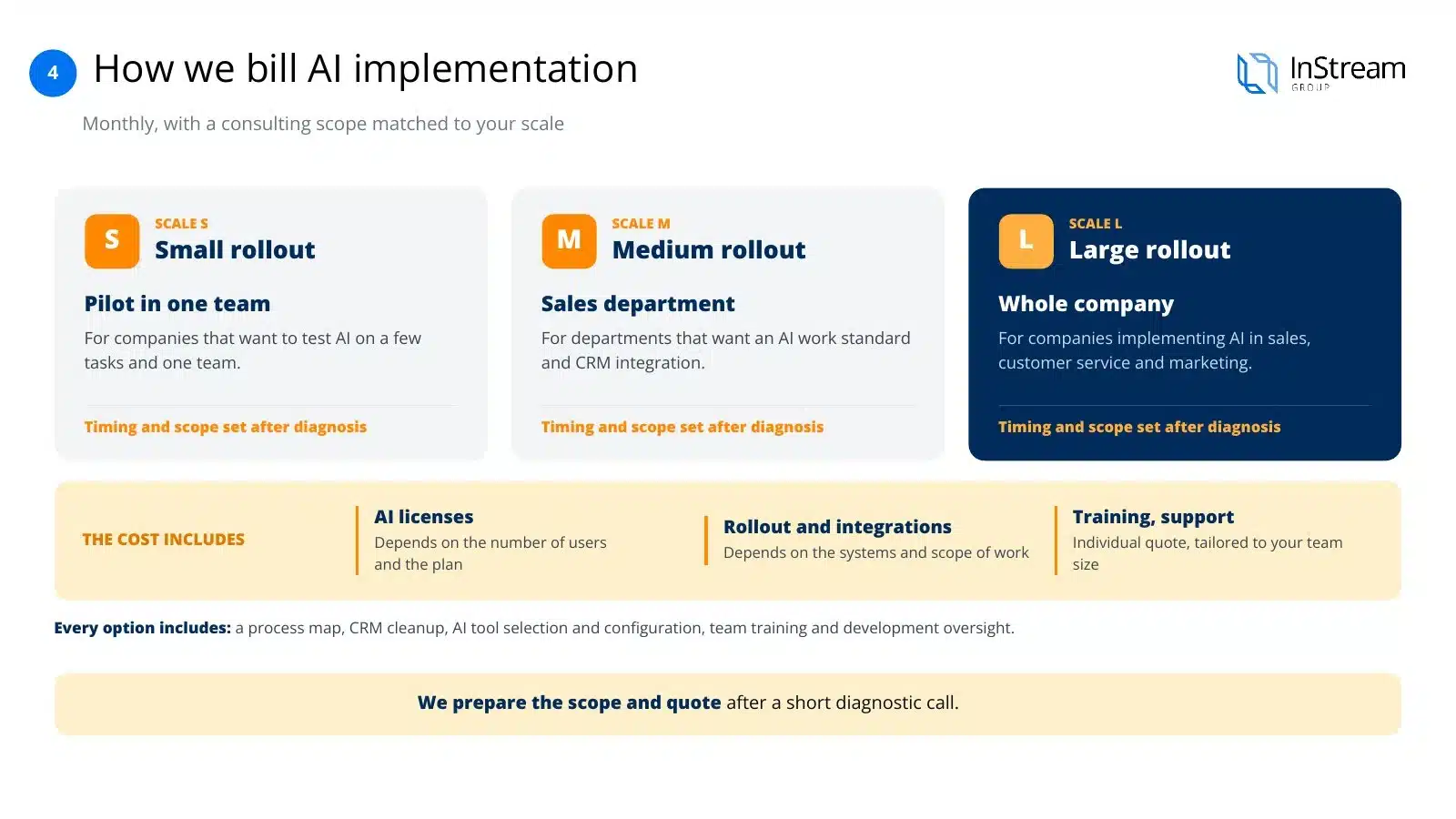
We bill AI implementation like other Sales House projects: monthly, with the scope of consulting work matched to the scale.
Small implementation
Pilot in one team
Time and scope agreed after the diagnosis
For companies that want to test AI on a few tasks and one team.
Medium implementation
Sales department
Time and scope agreed after the diagnosis
For departments that want to implement a standard for working with AI and CRM integration.
Large implementation
Whole organisation
Time and scope agreed after the diagnosis
For companies implementing AI in sales, customer service and marketing.
Each variant includes: a process map, an orderly CRM, selection and configuration of AI tools, team training and development supervision.
We prepare the scope and quote for your situation after a short diagnostic call.
Clients and their stories
Our clients' success and satisfaction matter most to us. Join more than 1,700 companies worldwide for which we have generated leads.
Case study
Emitel × InStream
Cold Email campaign: boosting in-building mobile network coverage.
105 hot leads350% of the guarantee deliveredClient testimonial
Mr Staff Support
Recruitment of drivers and workers from Asia. Magdalena talks about working with InStream.
Case study
Studio201 × InStream
Cold Email campaign for a software house: apps and AI implementations.
119 hot leads3 signed contractsClient testimonial
Packon
Cardboard packaging manufacturer. Konrad Wijata talks about working with InStream.
Case study
Personal System × InStream
Cold Email campaign for a permanent and temporary staffing agency.
40 hot leads in 3 months17,000+ messagesClient testimonial
Proexwork
Staffing agency. Maciej Krutul talks about working with InStream.
Case study
StethoMe × InStream
LinkedIn: the CEO's personal brand and US market outreach in 4 months.
607 invitations13.5% acceptance rateCase study
Iguana Group × InStream
Cold Email campaign to schools: sports equipment.
43 hot leads419 repliesClient testimonial
HSK Consulting
Employee hiring services. Jarosław Multan talks about working with InStream.
Client testimonial
MAAG Gear
LinkedIn campaign, 2 years of working together. Krzysztof Orłowski talks about working with InStream.
Client stories
See how we help companies like yours
Testimonials, case studies and campaign results from our clients in Poland and around the world.
See client storiesNeed to verify our effectiveness?
We have supported more than 1,700 companies worldwide in sales. During a conversation with our consultant, ask for references or the possibility of business contact with selected clients. Book a presentation of our work or ask us to prepare an initial vision of cooperation.
Check our Google reviews

Despite operating at such a large scale, we keep negative reactions to a minimum. Our positive Google reviews are the best proof of that.
Ask for written references

We have hundreds of recommendations from satisfied clients that confirm the effectiveness of our work. Ask a consultant for examples of projects from your industry and written references.
Talk to our clients

Interested in a specific project? Contact our consultant to get the chance to talk to selected clients. Our business partners are happy to share their experience.
Key questions about AI implementation
Where should an AI implementation in sales start?
With the process, not the tool. First we look at how you sell and which tasks take up the most of the team's time. Only then do we choose AI that will take over or speed up those tasks.
Will AI replace my salespeople?
No. AI takes over repetitive tasks and preparation, while conversations, relationships and decisions stay with people.
How long does an AI implementation take?
It depends on the scale: a pilot in one team is faster than an implementation across the whole organisation. We agree the timing after the diagnosis.
Is my clients' data safe?
We choose solutions with clear rules for businesses and agree with you which data goes to AI. On Claude business plans, Anthropic doesn't train models on customer conversations.
Are you tied to one AI vendor?
No. We back Claude, but we choose tools to fit the tasks and rules in your company.
Do you train the whole team or only the leaders?
The whole team. We run training on salespeople's real tasks, and we teach leaders how to lead a team that works with AI.
Can I implement AI if I don't have a CRM?
Yes, but we'll start with the process and basic order in the data. AI connected to a CRM delivers much more.
What happens after the implementation ends?
We stay on in development supervision: we check how the team uses AI and add further use cases.
What if we have AI but nobody uses it?
A common scenario. We start by diagnosing what's missing: process, data, integration or team habits.
How does this differ from an IT implementation company?
An IT company launches a tool. We start with the sales process and stay until the team actually works with AI.
Will AI connect to my CRM?
In most cases yes, via ready-made integrations or connectors, e.g. MCP. We check this at the tool selection stage.
How does billing work?
Monthly, in one of three variants matched to the scale of the implementation.
Worth reading
The era of AI in sales is already here
Selected articles and reports showing how AI is changing the work of sales teams around the world.
How Anthropic’s business development team uses Claude to run inbound and outbound at scale
Read the article Anthropic · Claude BlogJune 2026How one Anthropic seller rebuilt his team’s workflows with Claude Code
Read the article McKinsey & CompanySeptember 2024An unconstrained future: How generative AI could reshape B2B sales
Read the article SalesforceJuly 2024Sales Teams Using AI 1.3x More Likely to See Revenue Increase
Read the article Gartner · destinationCRMSeptember 2026AI Agents Will Outnumber Sellers 10-to-1 by 2028
Read the article HubSpot2023Smarter Selling with AI: New Data on How the Sales Process Is Changing
Read the articleArticles in English; links lead to external sources.
Before you buy an AI tool, choose your approach to implementation
A diagnostic call shows what stage you're at and which tasks AI can take over in your sales.